

Introduction
What happens in your KNX installation when the alarm goes off? If the answer is "the siren rings" — your building isn't as smart as it could be. The new AJAX-KNX Gateway by Elausys bridges the gap between one of the fastest-growing alarm platforms in Europe and the KNX ecosystem, giving integrators full bidirectional control between AJAX security and KNX building automation.
What Is a KNX Alarm Gateway — and Why Does It Matter?
A KNX alarm gateway is a hardware interface that connects a professional alarm system to the KNX bus, enabling real-time, bidirectional communication between security events and building automation functions.
In practical terms, this means your KNX installation can react to alarm events — and your alarm system can be controlled from any KNX visualisation, touch panel, or push-button.
Why does this matter for integrators?
Without a gateway, alarm systems and KNX operate as two separate islands. The alarm detects an intrusion, but the building doesn't respond. The client arms the system at night, but the lighting and blinds don't adjust. A KNX alarm gateway eliminates this disconnect. It turns passive alarm events into active building automation triggers — and it allows clients to manage everything from a single interface.
Key terms to understand:
- Bidirectional communication — the gateway both reads status from the alarm system and sends commands back to it
- Zone status — the state of individual alarm sensors (motion detectors, door/window contacts, etc.) mapped to KNX group objects
- Area control — the ability to arm, partially arm (night mode), or disarm alarm partitions directly from KNX
- Scene recall — automatic activation of predefined KNX scenes when alarm states change (e.g., arming triggers a "night" scene)
- SIA protocol — the standard alarm communication protocol used by AJAX to transmit events to monitoring stations and third-party devices
AJAX Meets KNX: What the AJAX-KNX Gateway Brings to Your Projects
Why AJAX?
AJAX Systems has rapidly become one of the most popular professional alarm platforms in Europe and beyond. Known for its wireless reliability, sleek design, and user-friendly app, AJAX is increasingly specified in residential and commercial projects where KNX is already the building automation backbone.
Until now, integrators working with both AJAX and KNX had no native way to connect the two. Security operated in its own silo — separate app, separate logic, no interaction with the rest of the building.

What the AJAX-KNX Gateway delivers
The Elausys AJAX-KNX Gateway provides a full integration layer between AJAX Hub systems and the KNX bus:
- Up to 96 zone statuses mapped to individual KNX group objects — monitor every AJAX sensor (MotionProtect, DoorProtect, GlassProtect, etc.) directly on the KNX bus when the system is armed or when zones are set to Always Active.
- Up to 4 area controls — arm, partially arm, and disarm AJAX partitions from any KNX visualisation, touch panel, or wall switch
- 6 area status feedbacks on KNX — disarmed, armed, partial armed (night mode), fire alarm, panic alarm, intrusion alarm
- Automatic KNX scene recall — assign a KNX scene (0–64) to each area status, triggered automatically when the status changes
- Power supply monitoring — AC failure and battery failure status available as KNX group objects
Same ETS workflow, new alarm brand
If you've already deployed other Elausys alarm gateways (Jablotron, Paradox, Interlogix, GE Caddx, or AnB Rimex), the AJAX-KNX Gateway follows the exact same unified ETS application concept. The parameter structure, group objects, and commissioning workflow are consistent across all models. Learn once, deploy everywhere — regardless of the alarm brand on site.
Practical Implementation: How to Set Up the AJAX-KNX Gateway
Step-by-step integration process
Step 1 — Hardware installation
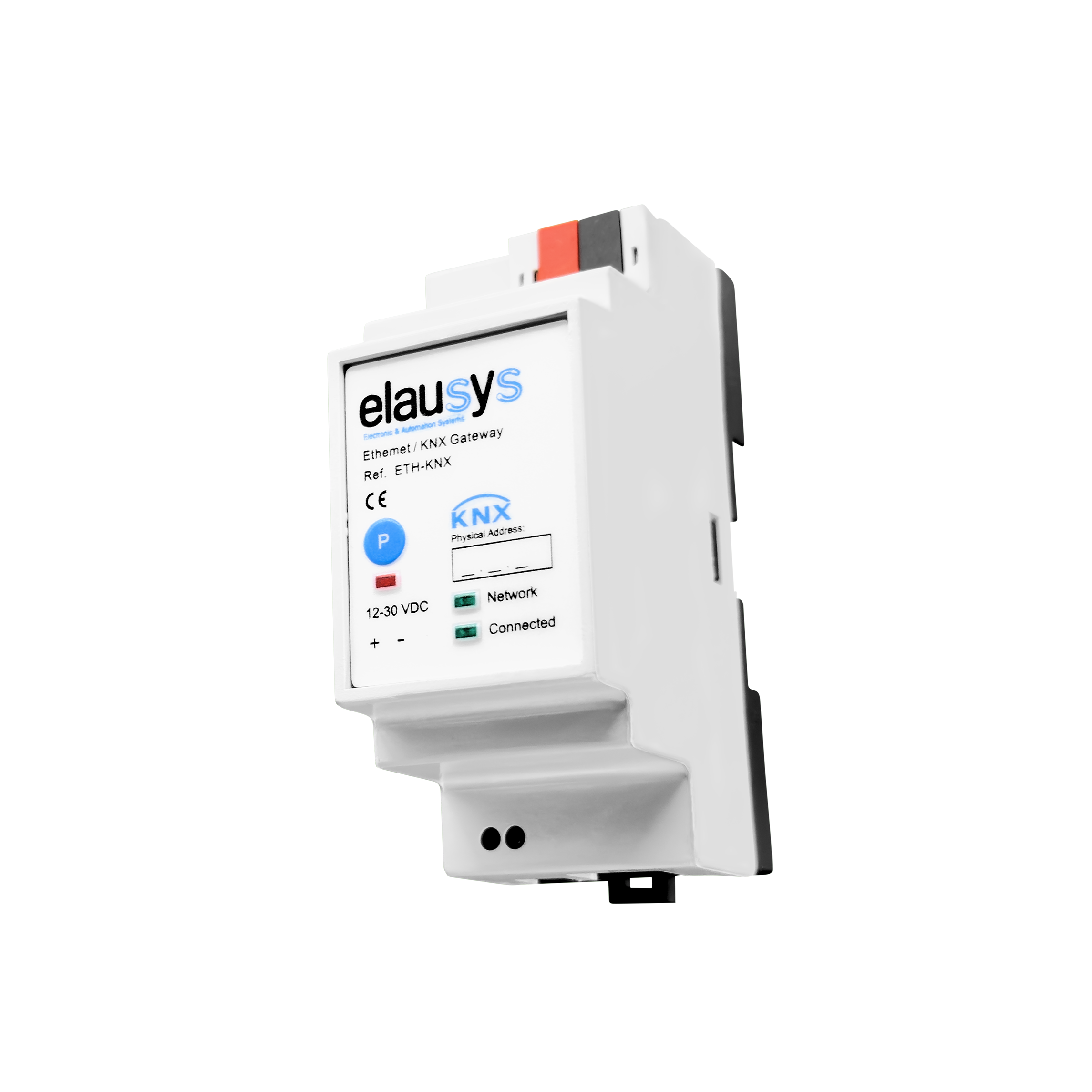
Mount the AJAX-KNX Gateway on a DIN rail. Connect the KNX bus on the top side and the external 12–30VDC power supply on the bottom, alongside the RJ45 Ethernet cable. The gateway communicates with the AJAX Hub over the local network. For arming/disarming from KNX an internet access is required.
Step 2 — Configure the AJAX Hub for SIA Events
On the AJAX side, configure your AJAX Hub to send SIA Events to the KNX Gateway. This is the communication protocol the gateway uses to receive alarm statuses and zone events in real time.
Step 3 — Invite Elausys as Security Company (for area control)
If you need bidirectional control — meaning you want to arm or disarm AJAX areas from KNX — you must invite Elausys as a Security Company in the AJAX app. This grants the gateway the necessary permissions to send commands back to the AJAX Hub.
Note: If you only need zone monitoring and status feedback (one-way), this step is optional.
Step 4 — ETS configuration
Import the AJAX-KNX Gateway into your ETS project. Configure the parameters:
- Set the number of zones (up to 96)
- Set the number of areas (up to 4) and area mapping for areas 5–8 if needed
- Assign KNX scene numbers (0–64) to each area status (armed, disarmed, fire, intrusion, etc.)
- Link zone and area group objects to your KNX visualisation, lighting, blinds, or HVAC groups
- Add your AJAX Hub ID into the Device Options parameter field
Step 5 — Verify and commission
Check the front panel LEDs: Network confirms Ethernet connectivity, Connected confirms active communication with the AJAX Hub. Test zone triggers and area commands from your KNX visualisation to verify bidirectional operation.
Understand zone reporting behaviour
By default, AJAX motion detectors (MotionProtect) and door/window contacts (DoorProtect) only report zone status to the gateway when the system is armed or in night mode. This means that in disarmed state, motion and door events are not transmitted to KNX.
If you want zone status available on KNX at all times — for example, motion-triggered lighting during the day or door-triggered welcome scenes — you can configure individual devices as Always Active (24hrs) in the AJAX app.
Important: setting a device to Always Active means it will also trigger the alarm even when the system is not armed. This is by design in the AJAX platform. Use this setting selectively and only on zones where permanent reporting is needed.
Real-world use cases
- Night mode activation: The client arms the system before leaving or going to bed → the gateway sends the armed status to KNX → a "Night" scene is recalled automatically: all lights switch off, blinds close, heating shifts to setback mode, and presence simulation activates on selected rooms. The entire building shifts into security mode from a single action on the AJAX app or KNX panel.
- Intrusion response: An intrusion is detected on Area 1 → the gateway sends the intrusion alarm status to KNX → a predefined emergency scene activates automatically: escape route lighting turns on, exterior lights illuminate the perimeter, and blinds open to provide visibility. The building doesn't just sound a siren — it actively responds to protect people and property.
- Fire alarm coordination: A fire alarm triggers on Area 2 → the gateway sends the fire alarm status to KNX → the assigned scene recalls immediately: all blinds open to clear escape routes, emergency lighting activates across the affected zone, and ventilation shuts down to prevent smoke spread. One alarm event orchestrates the entire building response — no manual intervention needed.
Common mistakes to avoid
- Not understanding zone reporting behaviour — AJAX sensors only report zone status to KNX when the system is armed (or in night mode). Setting devices to Always Active enables daytime reporting, but also means those zones will trigger the alarm when the system is disarmed. Plan which zones genuinely need 24/7 KNX reporting and which can rely on armed-state reporting only.
- Not inviting Elausys as Security Company — area control (arm/disarm from KNX) won't work without this step
- Skipping the scene assignment — the gateway supports automatic scene recall, but scenes default to 0 (disabled). You have to configure them manually in ETS for every area status you want to automate
- Using the gateway for 97+ zones — a single gateway covers zones 1–96 maximum.
Conclusion & Next Steps
The AJAX-KNX Gateway opens the door to fully integrated security and building automation for every project using AJAX alarm systems. By bridging alarm event monitoring, area control, and sensor-driven automation into your KNX installation, integrators can deliver smarter buildings — and offer their clients a single, unified control experience for security, lighting, blinds, and HVAC.
Ready to integrate AJAX into your KNX projects?
→ Browse the full Elausys KNX Alarm Gateway range — compare all supported alarm brands
→ Download the AJAX-KNX Gateway datasheet and ETS database — everything you need to start your first project
→ Contact Elausys support — get help with configuration, commissioning, or multi-gateway setups
Topics : AJAX KNX gateway, AJAX alarm KNX integration, KNX alarm gateway, AJAX smart building, KNX security integration, alarm system building automation, KNX zone monitoring, bidirectional alarm communication, ETS alarm configuration, SIA protocol KNX, alarm scene recall, smart building security, KNX group objects alarm, intrusion detection KNX
Frequently Asked Questions
What AJAX systems are compatible with the AJAX-KNX Gateway?
The AJAX-KNX Gateway is compatible with AJAX Hub systems that support SIA event transmission over the local network. This includes all AJAX Hub, Hub Plus, and Hub 2 models.
Can I arm and disarm the AJAX system from a KNX touch panel?
Yes. Once you invite Elausys as a Security Company in the AJAX app, the gateway supports full bidirectional area control: arm, partial arm (night mode), and disarm commands can be sent from any KNX visualisation, touch panel, or push-button.
Can I use AJAX motion detectors to control KNX lighting?
Yes, but with an important limitation. By default, AJAX motion detectors only report zone status when the system is armed or in night mode — so motion-triggered KNX lighting works automatically in those states. If you need motion detection on KNX while the system is disarmed (e.g., daytime corridor lighting), you can set individual MotionProtect devices to Always Active (24hrs) in the AJAX app. Be aware that Always Active zones will also trigger the alarm when the system is not armed, so use this setting selectively and only where appropriate.
How many zones and areas does the gateway support?
The gateway supports up to 96 zones with individual KNX group objects and up to 4 areas with full control (arm/partial arm/disarm) and 7 status feedback objects per area.
Is the ETS configuration the same as other Elausys alarm gateways?
Yes. The AJAX-KNX Gateway uses the same ETS application concept as all other Elausys alarm gateways (Use ETS entry for Interlogix). If you've configured one, you already know how to configure all of them.
What happens if the Ethernet connection between the gateway and the AJAX Hub drops?
The front panel Connected LED will turn off, indicating communication loss. The gateway's module status group object will send an error code to KNX, allowing your visualisation to display a connectivity fault. Zone statuses will hold their last known state until communication is restored.
Does the gateway require cloud connectivity?
The gateway communicates with the AJAX Hub over the local network via Ethernet to receive the events from the Hub. If arming or disarming commands are used from KNX, the connection is established through the AJAX secured cloud using an encrypted communication protocol similar to using the AJAX mobile application.
Can I trigger KNX scenes automatically when the alarm state changes?
Yes. Each of the 7 area statuses (disarmed, armed, partial armed (night mode), fire alarm, siren on, panic alarm, intrusion alarm) can be assigned a KNX scene number (0–64). When the status activates, the corresponding scene is automatically recalled on the KNX bus.
How is the gateway physically installed?
The AJAX-KNX Gateway is DIN rail mounted, requires an external 12–30VDC power supply, and connects to the KNX bus via the standard KNX connector. The Ethernet connection to the AJAX Hub uses a standard RJ45 cable. Galvanic isolation from the KNX bus is provided.
Can I use the AJAX-KNX Gateway alongside a security company that already receives SIA events?
Yes. The AJAX Hub can only send SIA events to a single destination. If the hub is already configured to report SIA events to a monitoring station or security company, you will need to redirect SIA event reporting to the AJAX-KNX Gateway instead. This means the gateway and an external SIA-based monitoring service cannot operate simultaneously on the same AJAX Hub. If the site requires a monitoring service, the Ajax system can be connected to the security company’s central monitoring station (CMS) using Cloud Signaling.