
Introduction
In many projects, a Jablotron 100 panel and a KNX installation share the same building but live in two completely separate worlds: the alarm protects the premises, the KNX bus runs lighting, blinds, and HVAC, and neither side knows what the other is doing. Motion detectors trigger nothing in KNX. Arming the system doesn't shift the building into night mode. A fire alarm doesn't open the blinds along the escape route. The JA-KNX Gateway by Elausys closes that gap — it lets the Jablotron panel and the KNX bus exchange zones, areas, and logical signals in real time, over a fully local RS485 link.
What Is a KNX Alarm Gateway — and Why Does It Matter?
A KNX alarm gateway is a hardware interface that connects a professional alarm system to the KNX bus, enabling real-time, bidirectional communication between security events and building automation functions.
In practical terms, this means your KNX installation can react to alarm events — and your alarm system can be controlled from any KNX visualisation, touch panel, or push-button.
Why does this matter for integrators?
Without a gateway, alarm systems and KNX operate as two separate islands. The alarm detects an intrusion, but the building doesn't respond. The client arms the system at night, but the lighting and blinds don't adjust. A KNX alarm gateway eliminates this disconnect. It turns passive alarm events into active building automation triggers — and it allows clients to manage everything from a single interface.
Key terms to understand:
- Bidirectional communication — the gateway both reads status from the alarm system and sends commands back to it
- Zone status — the state of individual alarm sensors (motion detectors, door/window contacts, etc.) mapped to KNX group objects
- Area control — the ability to arm, partially arm (stay/night mode), or disarm alarm partitions directly from KNX
- PG (Programmable Gate) — Jablotron's bidirectional logical input/output, configurable inside the alarm panel and exposed to KNX as both a control object and a status object
- Scene recall — automatic activation of predefined KNX scenes when alarm states change (e.g., arming triggers a "night" scene)
- RS485 bus — the wired serial protocol used between the Jablotron JA-121T module and the JA-KNX gateway, ensuring fully local communication with no cloud dependency
Jablotron Meets KNX: What the JA-KNX Gateway Brings to Your Projects
Why Jablotron?
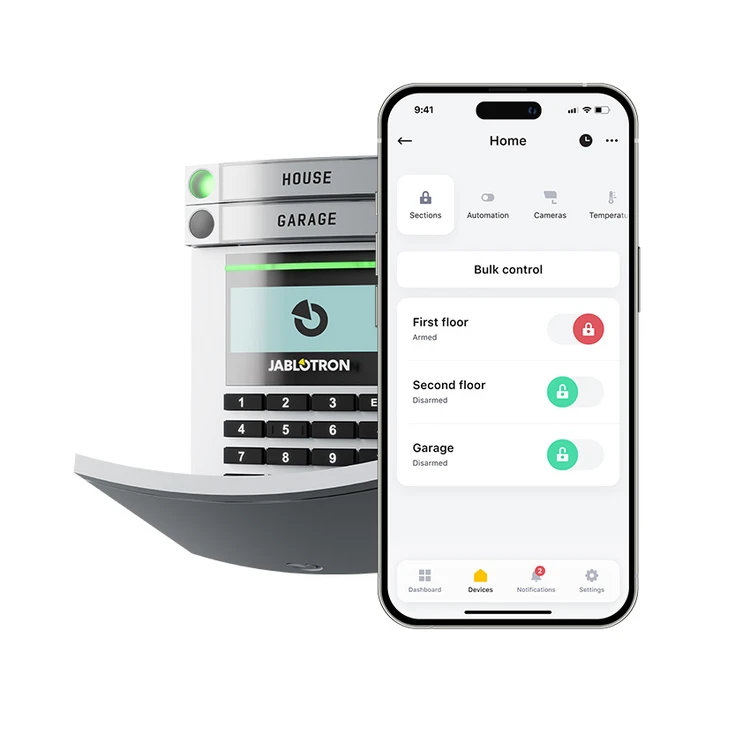
Jablotron 100 is one of the most widely installed professional alarm platforms in Europe, recognised for its hybrid wired/wireless architecture, robust panel range, and the simplicity of the MyJABLOTRON app. It's a frequent specification in residential, commercial, and small-tertiary projects — many of which already run on KNX for lighting, blinds, and HVAC.
Until now, integrators working with both Jablotron and KNX had no native way to connect the two. Security operated in its own silo — separate panel, separate logic, no interaction with the rest of the building.
What the JA-KNX Gateway delivers
The Elausys JA-KNX Gateway provides a full integration layer between Jablotron 100 panels and the KNX bus, over a local RS485 link to the Jablotron JA-121T communication module:
- Up to 96 zone statuses mapped to individual KNX group objects — monitor every Jablotron sensor (motion detectors, door/window magnetic contacts, glass-break detectors, smoke detectors, etc.) directly on the KNX bus, in real time. A Zones offset parameter lets you select either zones 1–96 or zones 97–192 of the alarm panel.
- Up to 32 bidirectional PGs (Programmable Gates) — each PG can be read as a KNX status and written from KNX, it is a shared input/output layer between the alarm system and the building. PGs can be triggered by alarm events, app actions, or KNX commands.
- Up to 4 area controls — arm, partially arm (stay mode), and disarm Jablotron partitions from any KNX visualisation, touch panel, or wall switch
- 9 area status feedbacks on KNX per area — disarmed, entry delay, exit delay, armed, partial armed, fire alarm, siren ON, panic alarm, intrusion alarm
- Automatic KNX scene recall — assign a KNX scene (0–64) to each area status, triggered automatically when the status changes
- Fully local communication — all events and commands transit the wired RS485 link; no internet connection or Jablotron cloud account is required for the gateway to operate
Practical Implementation: How to Set Up the JA-KNX Gateway
Step-by-step integration process
Step 1 — Hardware installation
The JA-KNX Gateway can be installed in two ways: directly inside the Jablotron control panel using the integrated mounting hole, or on an external DIN rail using the optional DIN-rail housing. Connect the KNX bus on the dedicated pluggable terminal, the 12VDC supply (taken from the Jablotron panel or an external power supply), and the RS485 bus (D+/D−) to the JA-121T module. The RS485 termination resistor is built into the JA-KNX, so no additional wiring is needed.
Step 2 — Configure the JA-121T for RS485 communication
On the Jablotron side, the panel must be equipped with a JA-121T RS485 communication module. Configure the JA-121T at 9600 baud so it can exchange telegrams with the JA-KNX gateway. All communication between the two devices is wired and local — no cloud, no Ethernet.
Step 3 — Create a dedicated user code for KNX area control
Area control commands (arm, partial arm, disarm) sent from KNX must be authenticated against a valid Jablotron user code. Create a dedicated user (or reuse an existing one) with the appropriate area permissions, and note its code — typically in the format prefix*PIN (e.g., 1*1234). Codes of 4 to 6 digits are supported.
Note: If you only need zone monitoring, PG status, and area status feedback (one-way), a user code is not required.
Step 4 — ETS configuration
Import the JA-KNX Gateway into your ETS project. Configure the parameters:
- Set whether to use PG control and/or PG status, and choose the number of PGs (16 or 32)
- Set the number of zones (16, 32, 48, 64, 72, or 96) and the zones offset (0 for zones 1–96, or 96 for zones 97–192)
- Set the number of areas (1 to 4) and the area mapping (e.g., remap KNX area 1 to alarm-system area 5 if needed)
- Enter the user code and user code length for area control
- Choose the Send area status behaviour (ON, OFF, or both edges)
- Choose the PG and Zone startup behaviour (Switch OFF, Switch ON, or Memory)
- Assign KNX scene numbers (0–64) to each area status (disarmed, entry, exit, armed, partial armed, fire, siren, panic, intrusion)
- Link zone, PG, and area group objects to your KNX visualisation, lighting, blinds, or HVAC groups
Step 5 — Verify and commission
Check the RX/TX LED on the gateway: it blinks each time an RS485 telegram is sent or received, confirming live communication with the JA-121T. Read the Firmware group object (sent automatically at power-up) to confirm the application is loaded — you should see a string like JA-KNX Rx.xx. Test zone triggers, PG actions, and area commands from your KNX visualisation to verify bidirectional operation.
Understand the service-mode behaviour
When a user is logged into service mode on the Jablotron alarm system, the RS485 and KNX interface of the JA-121T are disabled. This is by design — Jablotron locks out external bus traffic during programming. Don't be alarmed if your KNX status objects freeze while a technician is on-site reconfiguring the panel: communication resumes automatically when service mode is exited.
Real-world use cases
- Night mode activation: The client arms the system before going to bed → the gateway sends the armed status to KNX → a "Night" scene is recalled automatically: all lights switch off, blinds close, heating shifts to setback mode, and presence simulation activates on selected rooms. The entire building shifts into security mode from a single action on the keypad, the MyJABLOTRON app, or any KNX panel.
- Intrusion response: An intrusion is detected on Area 1 → the gateway sends the intrusion alarm status to KNX → a predefined emergency scene activates automatically: escape route lighting turns on, exterior lights illuminate the perimeter, and blinds open to provide visibility. The building doesn't just sound a siren — it actively responds to protect people and property.
- Fire alarm coordination: A fire alarm triggers on Area 2 → the gateway sends the fire alarm status to KNX → the assigned scene recalls immediately: all blinds open to clear escape routes, emergency lighting activates across the affected zone, and ventilation shuts down to prevent smoke spread. One alarm event orchestrates the entire building response — no manual intervention needed.
Common mistakes to avoid
- Powering the RS485 side incorrectly — the RS485 side of both the JA-121T and the JA-KNX must share the same external 12VDC supply (typically the Jablotron panel's own power supply, or a common external PSU). The power for the RS485 side does not come from the JA-KNX module itself. Using two independent power sources, or expecting the gateway to feed the JA-121T, leads to unstable communication or a completely silent RX/TX LED.
- Skipping the user code or using a wrong format — area control will silently fail without a valid user code in the correct
prefix*PINformat and the matching code length. - Skipping the scene assignment — the gateway supports automatic scene recall, but scenes default to 0 (disabled). You have to configure them manually in ETS for every area status you want to automate.
- Mistaking service mode for a fault — when the alarm panel is in service mode, the JA-121T disables external bus traffic. The gateway will look unresponsive until service mode is exited. This is normal Jablotron behaviour.
- Exceeding the gateway capacity — a single gateway covers up to 96 zones, 32 PGs, and 4 areas. Use the Zones offset parameter to address zones 97–192 if your installation needs them.
- Trying to use Virtual inputs or Power supply status — these parameters appear in the unified ETS application but are not supported by the Jablotron variant. Leave them set to Not used.
Conclusion & Next Steps
The JA-KNX Gateway opens the door to fully integrated security and building automation for every project using Jablotron 100 alarm systems. By bridging zone monitoring, bidirectional PG control, area arming, and sensor-driven automation into your KNX installation, integrators can deliver smarter buildings — and offer their clients a single, unified control experience for security, lighting, blinds, and HVAC.
Ready to integrate Jablotron into your KNX projects?
→ Browse the full Elausys KNX Alarm Gateway range — compare all supported alarm brands
→ Download the JA-KNX Gateway datasheet and ETS database — everything you need to start your first project
→ Contact Elausys support — get help with configuration, commissioning, or multi-gateway setups
Topics: Jablotron KNX gateway, Jablotron alarm KNX integration, KNX alarm gateway, Jablotron smart building, KNX security integration, alarm system building automation, KNX zone monitoring, Jablotron PG KNX, bidirectional alarm communication, ETS alarm configuration, RS485 alarm KNX, JA-121T integration, alarm scene recall, smart building security, KNX group objects alarm, intrusion detection KNX, Jablotron 100
Frequently Asked Questions
What Jablotron systems are compatible with the JA-KNX Gateway?
The JA-KNX Gateway is compatible with all Jablotron 100 series alarm panels equipped with the JA-121T RS485 communication module. The JA-121T is the mandatory bridge.
Can I arm and disarm the Jablotron system from a KNX touch panel?
Yes. Once a valid user code is configured in ETS, the gateway supports full bidirectional area control: arm, partial arm (stay mode), and disarm commands can be sent from any KNX visualisation, touch panel, or push-button.
What are PGs and why do they matter for KNX integration?
A PG (Programmable Gate) is a Jablotron logical input/output. The JA-KNX Gateway exposes up to 32 PGs as bidirectional KNX objects: one control object (KNX → Jablotron) and one status object (Jablotron → KNX) per PG. This means you can both drive a PG from KNX (to trigger a Jablotron scenario) and read its status (to react in KNX to events generated by the alarm logic). PGs are the most flexible bridge between the two systems.
How many zones, PGs, and areas does the gateway support?
The gateway supports up to 96 zones with individual KNX status objects (with an offset to access zones 97–192), up to 32 bidirectional PGs, and up to 4 areas with full control (arm/partial arm/disarm) and 9 status feedback objects per area.
Can I use Jablotron motion detectors to control KNX lighting?
Yes — each Jablotron zone is exposed as a KNX group object that reflects the live state of the corresponding sensor, but zone statuses are refreshed cyclically by the alarm panel every 5–8 seconds. That's too slow for responsive lighting control: the light would lag behind the motion event.
The recommended approach is to link a PG to the motion detector inside Jablotron, and drive the KNX light from that PG's status object. PGs are pushed to the bus immediately when they change state, so the light reacts instantly.
What happens if the RS485 connection between the gateway and the JA-121T drops?
The RX/TX LED stops blinking, indicating communication loss. The gateway's Module status group object sends an error code to KNX, allowing your visualisation to display a connectivity fault. Status objects hold their last known state until communication is restored.
Does the gateway require cloud connectivity?
No. The JA-KNX Gateway communicates with the Jablotron panel exclusively over the local RS485 bus, via the JA-121T module. No internet connection, no MyJABLOTRON cloud account, and no Ethernet cabling are required for the gateway to operate. Everything stays inside the building.
Can I trigger KNX scenes automatically when the alarm state changes?
Yes. Each of the 9 area statuses (disarmed, entry delay, exit delay, armed, partial armed, fire alarm, siren ON, panic alarm, intrusion alarm) can be assigned a KNX scene number (0–64). When the status activates, the corresponding scene is automatically recalled on the KNX bus via the dedicated Call scene group object.
How is the gateway physically installed?
The JA-KNX Gateway can be mounted in two ways: directly inside the Jablotron control panel using its integrated screw hole, or on an external DIN rail using the optional DIN-rail housing. It requires an external 12VDC supply (typically taken from the Jablotron panel itself), connects to the KNX bus via a pluggable push-wire terminal, and to the JA-121T via a screw RS485 terminal (D+ / D−). Galvanic isolation from the KNX bus is provided.
What are the technical specifications of the JA-KNX Gateway?
- Power supply: External 12VDC (from Jablotron panel or external PSU)
- KNX bus consumption: < 16 mA @ 29 VDC
- Operating temperature: 5 to +45 °C
- Dimensions (W × D × H): 81 × 29 × 20 mm
- KNX terminal: Pluggable micro terminal, push-wire, 0.6–0.8 mm² solid conductor
- RS485 terminal: Screw terminal D+ (A) / D− (B), built-in termination resistor
- Enclosure: Optional DIN-rail housing
Can the JA-KNX Gateway run alongside the MyJABLOTRON app and a monitoring station?
Yes. The JA-KNX Gateway is a passive RS485 listener and active commander — it does not replace the Jablotron event-reporting paths. The MyJABLOTRON app, GSM/IP communicators, and monitoring station reporting all continue to operate normally in parallel with the gateway.