
Connection arrangement
The KNX bus is connected on the top side of the gateway.
An external power supply 12-30VDC is required and connected on the bottom side of the module, beside the RJ45 connector for the ethernet cable.
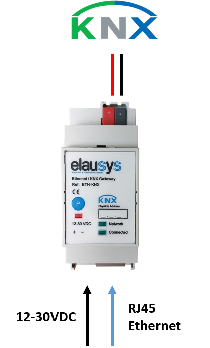
KNX at the top; auxiliary supply and Ethernet at the bottom.
| Front panel element | Meaning |
|---|---|
| Network LED | Physical Ethernet connection is established. |
| Connected LED | Communication with the inverter is established. |
| P button | KNX programming mode. |
| Red LED | KNX programming status. |
Compatibility and limitations
This gateway is intended to be used with a SUNGROW HYBRID inverter compatible with the modbus interface definition. Please refer to the inverter provider to check if your model is compatible with modbus TCP or contact us.
Compatible with the following models:
SH5K-20 / SH3K6 / SH4K6 / SH5K-V13 / SH5K-30 / SH3K6-30 / SH4K6-30 / SH5.0RS / SH3.6RS / SH4.6RS / SH6.0RS / SH10RT / SH8.0RT / SH6.0RT / SH5.0RT
The gateway may be compatible with other models (all compatible Modbus TCP inverters), contact us for confirmation.