
Factory reset erases the whole installation and returns the server to a blank state, while keeping its identity. Use it when an appliance changes owners or projects, or to restart a commissioning from scratch. To move a configuration or recover from a mistake, use backup & restore instead (see “Backup & Restore”) — a factory reset cannot be undone.
⚠️ Warning: There is no undo. If you may ever need this data again, create a backup first from the Backup page (see “Backup & Restore”).
What is erased, what survives
Open System in the sidebar and scroll to the Danger Zone. Click Reset to Factory Default. Before anything happens, the dialog shows a preview listing exactly what will be erased on this server, with the number of records per item:
- Widgets (devices) and their communication objects
- Rooms, categories, buildings, floors
- Scenarios and automations
- KNX group addresses, KNX bridge mappings and KNX bridge triggers
- App views and app view cards
- Custom entries
- User accounts and user preferences
- Protocol connections
Preserved: the serial number, the server token, and the internal service credentials (history database, dashboards, integration accounts). A server linked to an ElauPro project stays linked.
Every human account goes, including yours — so the server returns to the state it shipped in: no account at all. The next time the admin panel is opened it shows the Create administrator screen again, and issues a new one-time recovery code (see “Creating the First Administrator”). The old recovery code dies with the old account. Only the internal service accounts survive, and they cannot sign in to the panel.
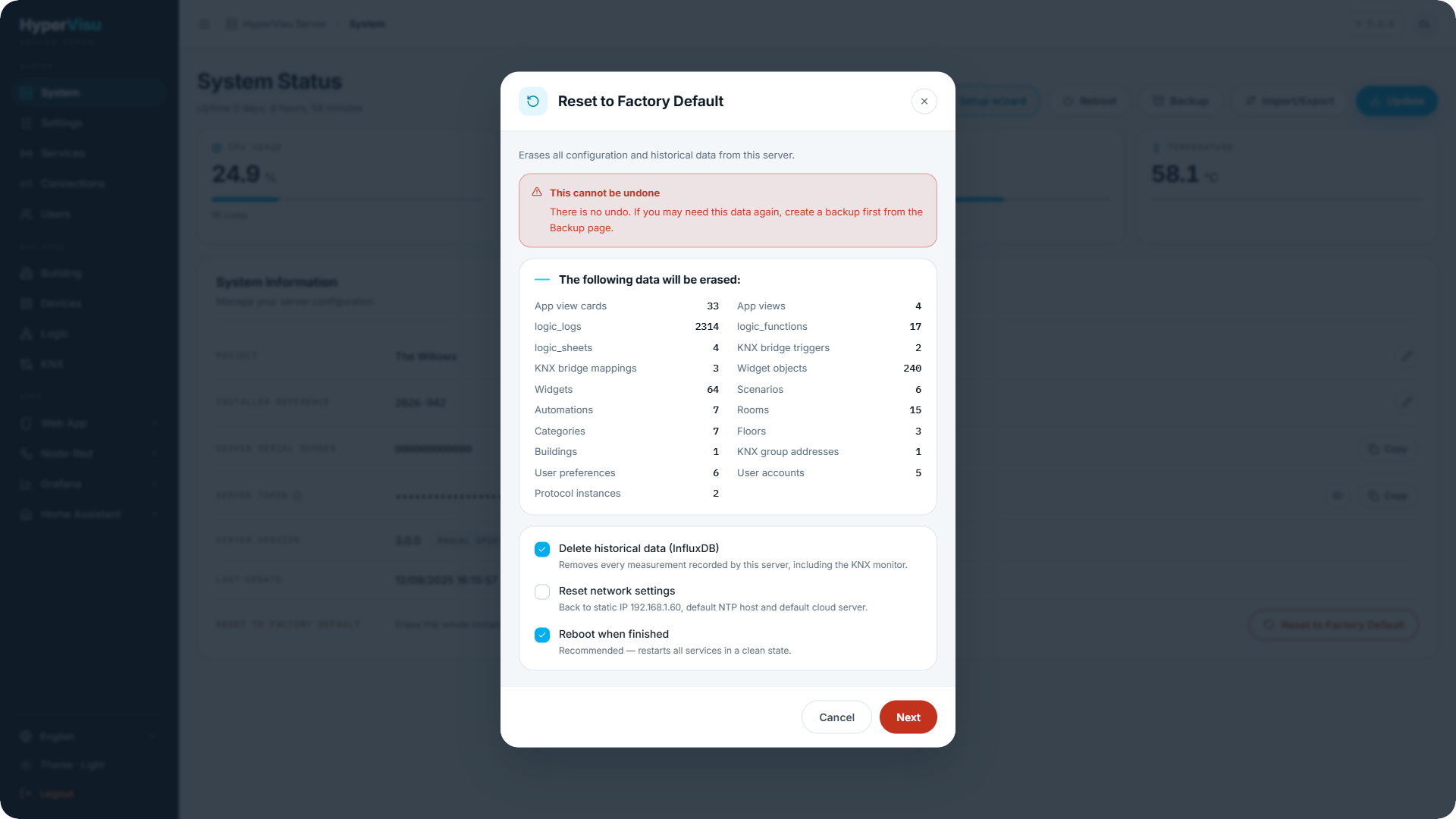
Options
| Option | Default | What it does |
|---|---|---|
| Delete historical data (InfluxDB) | On | Removes every recorded measurement, including the KNX monitor history. |
| Reset network settings | Off | Puts the server back on DHCP, with the default NTP host and the default cloud server. |
| Reboot when finished | On | Restarts all services in a clean state — recommended. |
⚠️ Warning: If you enable Reset network settings, you will lose access to the admin panel at its current address. The server switches to DHCP and comes back on an address assigned by your router. It announces itself as
hypervisu-<serial>.local, so open that name once it has restarted. If your network has no DHCP server, it comes back at192.168.1.60instead.
Confirming and running
The reset requires a deliberate confirmation:
- Type the server's serial number exactly as shown.
- Enter your password (the admin account you are signed in with).
- Click Reset to factory default.
The dialog shows Resetting to factory default… — do not power off the server. When it finishes, it reports the number of records deleted and, if selected, that the server is rebooting (available again in about a minute).
If the network was reset, the panel counts down while the change is applied, then probes the server's new name and offers Open the new address to jump straight to it.
After the reset
The server is back at its factory state: opening the admin panel shows the first-administrator setup (see “Creating the First Administrator”), followed by the setup wizard (see “First-Run Setup Wizard”). Because the server's identity survives, an ElauPro-linked server reconnects to its project without any re-linking.