
Block reference
The catalog holds 33 blocks in seven groups, in the order the palette shows them: Links, Calculations, Logic & selection, Comparisons, Timing, Memory & counters, Control. Compact per-block tables are in the reference card below; this section explains each one. Every block also carries its own explanation in the admin — open the block's help from the palette or the card.
Links
Direct link — passes a value from its input to its output, optionally transformed. Ports: In → Out (any type). Settings: Send mode (only when the value changes / every incoming telegram), Invert (booleans), Value mapping (remap specific values; applied before the inversion). Example: forward a staircase push button to a light on another protocol, inverted because the button reads 0 when pressed.
Filter — forwards a value only when it meets the conditions you set. It never changes the value: what comes out is what came in, or nothing at all. Where Direct link is about correcting a value on the way past, Filter is about how much of it gets past, and the two are meant to be used together.
- Ports: In (any type, required) and Enable → Out. Nothing is written on the telegrams it blocks — the far end simply keeps what it already had.
- Conditions — independent, all default to off, and every one you switch on must agree before a value goes through: Value must be (ON only, OFF only, Above/Below a level, Inside/Outside a range — a number counts as ON when it is anything other than 0); Forward when (Every telegram, Only when it changes, It moved by at least…, It switches ON or It switches OFF); Settle time (the value must stop moving for this long — the answer to a noisy analog sensor); Rate limit (at most one value per interval, either discarding what arrives inside the window or holding the latest and sending it the moment the window opens); Heartbeat (re-send the last forwarded value after this much silence, for a target that expects cyclic refreshing).
- The one subtlety worth knowing: only when it changes and minimum change are measured against the last value forwarded — the question they answer is whether the far end already holds it. Rising and falling are measured against the last value received, because an edge belongs to the incoming stream: a telegram that a value rule blocked still counts as having happened.
- Behavior worth knowing: discard can lose a transition for good, while hold the latest cannot — nothing is lost and everything is late by at most the interval, which is what makes it the right mode for a value that drives something. State is not kept across a restart: after a reboot the first telegram always passes the change rule, rather than the filter refusing to refresh a target holding whatever it had before the server went down.
- Example: a lux sensor reporting every two seconds floods the bus. Wire it through a Filter set to hold the latest, at most one per 60 s and the shading logic downstream sees one reading a minute instead of thirty — with the most recent one, not the oldest.
Selector — passes one of several values through, chosen by a number. Several values go in, a number says which one, and that one comes out unchanged — a set of points, not a formula.
- Ports: Select (number, required; can stay internal with a default of 1) and Value 1…n (any type, 2–8 of them) → Out.
- Key settings: Number of values; When Select is out of range — Write nothing — the target holds its value (default) or Write 0. A Select of 1 picks the first value, 2 the second; 0, a negative or a number past the last input is out of range. An unwired value input also writes nothing when selected.
- Behavior worth knowing: keep the values of one kind (all setpoints, or all switches) — the block passes whatever it is given and cannot make sense of a mix. Writing nothing on an out-of-range Select is deliberate: a mode selector passing through 0 on its way somewhere does not blank a setpoint.
- Example: a house mode (1 = home, 2 = away, 3 = night) from a Radio buttons function drives the Select; the three values are the three heating setpoints; the output feeds the Thermostat's Setpoint. Without it, choosing between three values means three comparators and three filters.
Calculations
Calculated value — combines 1–8 numeric inputs into one number. Ports: Input 1…n → Result. Settings: Operation — Sum, Average, Minimum, Maximum, Difference (in1 − in2), Product, Weighted sum, Scale + offset (in1 × factor + offset), or a free Formula; plus Decimals and a display Unit. Example: average three room temperature sensors into one reading that feeds a Thermostat's Measurement input.
Energy meter — turns a power (or flow) reading into cumulative energy registers, for meters whose device reports only power. Many clamp meters, load-sensing actuators and Home Assistant sensors report watts but no kWh counter — and everything the app charts (the Week/Month/Year bars, the totals, the energy overview) reads the counters. This block fills them in.
- Ports: Power (required) → Consumed and Produced — two ever-growing registers, in kWh (or m³ for water and gas).
- Key settings: Direction — Signed (positive power accumulates Consumed, negative accumulates Produced; the grid meter and the battery), Consumed only (consumers, chargers, water, gas), Produced only (inverters); Invert sign for a meter wired the other way round; Input unit (W → kWh, kW → kWh, l/h → m³, m³/h → m³); a Plausibility ceiling that discards glitch readings; the Consumed/Produced presets — the registers' starting values, and editing a preset resets both registers to the presets, which is how you align the block with the dial of the physical meter; Output decimals.
- Wiring: bind Power to the meter widget's object 1, and the outputs to the same widget's energy objects (2 and 3) in "Set state" mode. The registers are then stored, charted and totalled everywhere exactly as if the device had sent them. An energy object can only be "set" while it has no address of its own — if a group address is later assigned to it, the function reports the conflict until one of the two authors is removed.
- Behavior worth knowing: between reports the last power is held and integrated at least once a minute, so a device that reports rarely still accumulates correctly. A device silent for longer than the input watchdog (15 minutes unless changed on the binding) freezes the registers rather than billing its last reading forever. Server downtime is never invented into energy — the registers only ever err on the low side.
- Example: a KNX clamp meter on the workshop feed reports watts on 14/6/1. Create a Consumer meter widget with that address on object 1 and nothing on object 2, add an Energy meter function in Consumed only, bind Power → object 1 and Consumed → object 2, and set the Consumed preset to the reading on the physical dial. The workshop now has live power and daily/monthly/yearly consumption in the app.
Moving average — smooths a noisy value so a decision can be made on it. A lux sensor under moving cloud, a power meter that swings when the fridge starts, a wind gauge in gusts: fed straight into a comparator they chatter; fed through this block first, they do not.
- Ports: In (number, required), Reset → Smoothed.
- Key settings: Average over — A time window (default; Window 300 s, each value weighted by how long it actually held — the right choice for values that arrive on change), A number of readings (Readings, for sensors that report on a fixed cycle), or A time constant (Time constant 300 s: every new reading pulls the output part of the way towards itself, the smoothest of the three); Decimals; display Unit.
- Behavior worth knowing: smoothing is delay by construction — a five-minute window is on average two and a half minutes behind reality, which is what a shading decision wants and a frost alarm does not. A window or a time constant keeps aging old values out while the sensor is quiet; the window is rebuilt from scratch after a restart.
- Example: the weather station's brightness, averaged over 5 minutes, feeding the Automatic shutter's Brightness — passing clouds stop moving the blinds.
Dewpoint — works out the temperature at which the air in a room would start to condense, from its temperature and relative humidity, and — with a surface temperature wired in — whether anything is about to get wet.
- Ports: Temperature and Humidity (both required), Surface temperature (the cold thing: chilled ceiling, fan coil, window) → Dewpoint (°C), Condensation risk (on while the surface is within the safety margin of the dewpoint), Margin (K — how much room is left).
- Key settings: Safety margin (2 K), Hysteresis (1 K — extra distance before the risk clears again), Decimals. With no surface wired the block still gives the dewpoint and simply says nothing about risk.
- Example: at 24 °C and 60 % the dewpoint is about 15.7 °C; a chilled ceiling fed with 14 °C water raises Condensation risk — wire it to the cooling valve's enable through a NOT gate, or feed Margin to the flow-temperature control so the plant eases off before it trips.
Logic & selection
AND — output is on only when all inputs (2–8) are on. Example: "heating demand AND window closed" before enabling a valve.
OR — output is on when any input (2–8) is on. Example: motion in any of three hallway sensors switches the corridor light.
XOR — output is on when an odd number of inputs (2–8) are on. Example: two-way switching from two toggle inputs.
NOT — inverts its single boolean input. Example: turn a "window open" contact into a "window closed" enable signal.
Radio buttons — several inputs, exactly one output on; the last one to fire wins. Fire option 3 and Out 3 comes on while every other output goes off — the rule a car radio's preset buttons follow.
- Ports: Option 1…n (boolean, 2–8, all optional, edge-triggered), Select (number — jumps to that position when the number changes; 0 or out of range clears), Clear → Position (number) and Out 1…8 (boolean; outputs above the configured count exist but never come on).
- Key settings: Number of options; Position on a brand new function (0 = nothing selected; after that the remembered position wins).
- Behavior worth knowing: the selection survives a restart. Because only one output can ever be on, "two things true at once" becomes impossible instead of something the rest of the sheet must keep checking for.
- Example: heating / cooling / off that must never run together: three wall buttons on the options, Out 1 to the heating enable, Out 2 to the cooling enable. Or a house mode whose Position drives a Selector.
Sequencer — one trigger steps through up to eight outputs, one at a time: every Next lights the following output and switches the rest off. The sibling of Radio buttons — that one has one input per option and answers "which one"; this one has one trigger and answers "the next one".
- Ports: Next (required), Previous, Reset, Enable (off ignores the triggers and holds the current step) → Position and Out 1…8.
- Key settings: Number of steps; Include the all-off step (on: the cycle runs 0, 1, 2, 3 and back to 0, so one press turns everything off); Wrap round at the end; Position after a reset.
- Behavior worth knowing: the position survives a restart; Enable freezes the sequence without losing the place.
- Example: one wall button walks through three lighting scenes and off — wire each Out to a scenario as an action target (see “Function Setup & Outputs”).
Bit decoder — splits a number (0–255) into its eight individual bits: a status byte off a KNX actuator, an alarm register from a Modbus gateway, a packed set of flags from an HTTP device. Ports: Value → Bit 0 (1) … Bit 7 (128) — the weight is printed on every port so it can be read off a datasheet. Values are truncated and clamped to 0–255; wire only the bits you need. Example: bit 3 of an actuator's status byte becomes an "overload" flag feeding a notification action.
Bit encoder — the mirror: up to eight booleans in, the number they add up to out (bits 0 and 2 on → 5). Ports: Bit 0 (1) … Bit 7 (128) → Value. A bit left unwired counts as 0, so a four-bit device is usable without pretending it has eight. The output moves whenever any bit does — put a Filter with a short settle time after it if several bits change together. Example: a ventilation unit whose mode is a packed byte.
Comparisons
Comparator — compares a number against a threshold. Ports: Value, optional Threshold input → boolean Out. Settings: Comparison (>, >=, <, <=, ==, !=), a Fixed threshold (used when no Threshold input is wired), and a Deadband to stop chatter near the threshold. Example: power > 5000 W raises an overload flag.
Hysteresis — a two-threshold switch: on above the Upper threshold, off below the Lower threshold, unchanged in between; Invert flips it. Example: switch a cellar dehumidifier on at 70 % humidity and off at 60 %.
Timing
On-delay — the output follows the input on, but only after the input has stayed on for Delay seconds (default 10 s); switching off is immediate. Example: ignore a presence blip shorter than 30 s before starting ventilation.
Off-delay — the output switches on immediately but stays on for Delay seconds (default 30 s) after the input goes off. Example: keep the bathroom fan running 5 minutes after the light goes out.
Staircase timer — a trigger starts the output for Duration seconds (default 180 s), then it switches off by itself. Settings: Restart on a new press (retrigger) and A release ends it early. Example: the classic stairwell light.
Pulse — turns any trigger into one fixed pulse of Pulse length seconds (default 1 s). Example: fire a 1 s impulse to a garage-door contact from a scene.
Minimum runtime — enforces Minimum on time and Minimum off time (default 300 s each) on a switching command. Example: protect a heat-pump compressor from short cycling, wired between a Thermostat's Heat output and the actuator.
Schedule — a weekly program producing a boolean; it has no inputs. Settings: the weekly Change points and Invert. Output: Active. Example: "shop hours" — on Mon–Sat 08:30, off 18:30 — gating the shop-window lighting through an AND gate.
Multi-click — tells single, double, triple, quadruple and long presses apart on one button, so one wall button drives up to five things — on a retrofit, often the whole job.
- Ports: Button (boolean, required) → Single, Double, Triple, Quadruple, Long press (each a short pulse) and Clicks (the number last recognised, to drive a Selector).
- Key settings: Clicks to recognise (default 2 — faster clicking counts as this many); Gap between clicks (0.35 s — also how long every click output is delayed by); Long press after (0.8 s, measured from the press itself so it fires while the finger is down; 0 turns long presses off and makes single clicks fire sooner); Output pulse length.
- Behavior worth knowing: it counts edges, so the button must send both the press and the release (in ETS: send 1 on press and 0 on release). If nothing happens on a double click, that setting is the first place to look. Nothing survives a restart.
- Example: kitchen button — single press toggles the ceiling light (through a Latch), double press runs the "Dinner" scenario (an action target, see “Function Setup & Outputs”), long press switches everything off.
Pulse generator — a clock: while Enable is on the output goes on for On for seconds, off for Off for seconds (defaults 1 s / 59 s), and round again, with no input needed. Setting: Start the cycle On or Off. Turning Enable back on restarts the cycle from the beginning, and the phase is computed from the start time so it cannot drift and keeps its place across a restart. Neither half may be under 0.5 s and together they must be at least 2 s — the engine's runaway guard (see “Logic Validation, Monitoring & Safety”) is the reason. Example: a heartbeat another system watches for, or a flashing indicator during an alarm.
Ramp — follows a target value at a limited rate instead of jumping to it: a dimmer that fades over ten seconds, a setpoint that walks to its new value so the heating does not slam, a fan that spools up.
- Ports: Target (number, required), Hold (freezes the output where it is; the ramp carries on when released), Reset (jumps straight to the start value) → Out and Moving.
- Key settings: Rate (units per second — 10 on a 0–100 dimmer is a ten-second fade; 0.05 on a temperature in degrees), Step every (1 s — every step is one telegram), Start value, Minimum / Maximum, Decimals (fewer decimals make small steps identical and not worth sending), display Unit.
- Behavior worth knowing: a restart does not resume a ramp — the output starts again from the start value and travels to the current target.
- Example: between a Selector choosing the evening brightness and the dimmer, a Ramp at rate 10 turns a scene change into a soft fade.
Memory & counters
Latch — remembers on or off. Something turns it on, something else turns it off, and in between it stays where it was put — the one thing no other block could do. Wire a wall button to Toggle and you have a switch the house owns rather than the actuator.
- Ports: Set, Reset, Toggle (always edge-triggered), Enable (off ignores all three and holds the output — a child lock) → Out.
- Key settings: Set and reset act — The moment they arrive (edge, default — what buttons want) or For as long as they are on (level — what interlocks want; a comparator wired to Reset holds the latch off while its condition is true); If set and reset act together — Reset wins (default) or Set wins; Value before anything has happened.
- Behavior worth knowing: the value survives a restart — "holiday mode" or "alarm acknowledged" must not be forgotten by a power cut. A press that arrives while Enable is off is lost, not queued.
- Example: "Holiday mode": a Set from the app's virtual flag, a Reset from the front-door contact opening after the holiday period, Out lowering every Thermostat through their User mode inputs.
Value memory — captures a value when told to and holds it until told again: the answer to "what was it before?".
- Ports: In (any type, required), Sample (boolean, required), Reset → Held (the same kind of thing as In).
- Key settings: Capture when Sample goes On / Off / Either way; Value on reset — leave empty and Reset only clears the memory without writing anything, type a value and Reset writes it instead.
- Behavior worth knowing: before the first sample it writes nothing (a memory that was never given a value has no answer, and inventing 0 would put a real command on the bus). The held value survives a restart.
- Example: sample the lounge brightness when the alarm is raised and every light is forced to full; when the alarm clears, the held value restores it.
Counter — adds one to a number every time Count up fires, takes one away on Count down, and remembers the total: door openings, cycles run, pump starts.
- Ports: Count up, Count down, Reset, Enable (off stops it counting; Reset still works) → Count (number) and At limit (boolean).
- Key settings: Step (1, both directions); Value after a reset; Minimum / Maximum (optional and independent); Wrap round at the limits (needs both limits — past the maximum the count jumps to the minimum, which turns the block into a selector: maximum 4, wrapping on, one button cycles 1, 2, 3, 4, 1); Decimals; display Unit.
- Behavior worth knowing: both counting inputs act on the moment they arrive, so a contact held closed counts once. Reset always wins over a count in the same evaluation. The count survives a restart.
- Example: count garage-door cycles and raise a maintenance notification (action target) at 5 000 through a Comparator.
Runtime counter — totals how long something has run and raises a service-due flag: pump hours, compressor hours, UV lamp hours, filter hours.
- Ports: Running (boolean, required), Service done, Reset everything → Total runtime, Since service, Until service, Service due (boolean), Starts (how many times it switched on — short cycling wears a compressor faster than running does).
- Key settings: Unit (Seconds, Minutes, Hours (default), Days), Service interval (0 turns the service outputs off), Decimals — hours to one decimal moves every six minutes, to two decimals every 36 seconds; on a KNX bus that is the difference between a reading and a flood.
- Behavior worth knowing: time is credited in real minutes; a gap of more than two minutes is treated as downtime and thrown away rather than guessed. Service done clears only the service total; the lifetime total keeps climbing.
- Example: the ventilation unit's run output on Running, service interval 2 000 h, Service due wired to an e-mail action (see “Function Setup & Outputs”) — the installation asks for its own filter change.
Min / max — the lowest, highest and average of a value since the period began: the coldest point last night, this month's peak power, the highest CO₂ the meeting room reached this week.
- Ports: In (number, required), Reset → Minimum, Maximum, Average.
- Key settings: Start again — Never — only on the Reset input (an all-time record), Every day (default), Every week, on Monday, Every month, on the 1st; At (the hour of the reset — 6 in the morning makes "today" the day you actually live in); Decimals; display Unit.
- Behavior worth knowing: the average is time-weighted — every value counts for as long as it was true, so a five-minute spike from a sensor that reports on change does not weigh as much as eleven quiet hours. Before the first reading it writes nothing; the block wakes itself at the period boundary.
- Example: materialize Maximum of the grid meter's power as "Today's peak" (see “Function Setup & Outputs”) and place it on the Energy view.
Control
Thermostat — a complete room temperature controller. It can drive heating, cooling or both, and it can be wired as the controller behind a climate device, so the thermostat page in the app (modes, setpoint, boost) drives this function.
- Inputs: Measurement (the room temperature — required), Setpoint, User mode (comfort/standby/night), Season, Enable, Window (a window contact that sets the controller back while open, after the Window delay).
- Outputs: Heat and Cool (switching), Heat % and Cool % (0–100 % for proportional/PWM), Effective setpoint, User mode feedback, State.
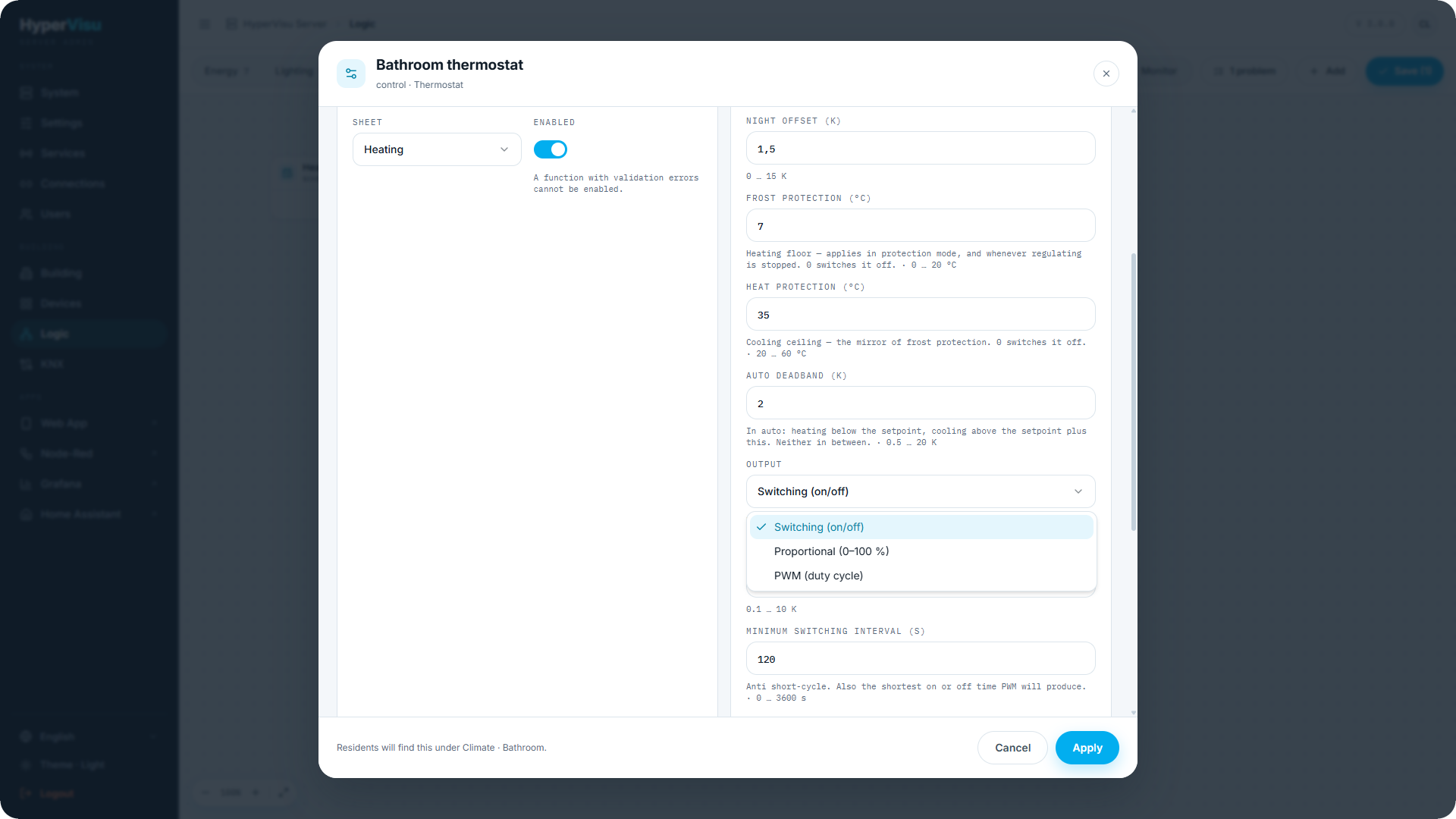
- Key settings: Season (Heating, Cooling, Auto (both) with an Auto deadband between the two); mode handling — comfort uses the setpoint itself, Standby offset and Night offset set it back per mode, Frost protection and Heat protection are the safety limits; Output (Switching (on/off) with Hysteresis, Proportional (0–100 %) with a Proportional band, or PWM (duty cycle) with a PWM period); Minimum switching interval; Setpoint minimum/maximum.
- Example: bind Measurement to the KNX room sensor, wire Heat to the valve actuator, give the function the room and the Heating category, and bind it behind the room's climate widget — the resident's app page now drives this controller, and Boost behaves as documented in “Thermostats, Air Conditioning & Ventilation”.
Automatic shutter — sun-shading logic for one facade. It shades when the sun is on the facade and it is bright (and, optionally, warm), and it retracts when conditions pass.
- Inputs: Brightness (required), Temperature, Presence, Wind alarm, Enable.
- Outputs: Position and Slats (0–100 %), to wire to the shutter widget.
- Key settings: Brightness threshold + Brightness hysteresis (defaults 40 000 / 10 000 lux); Temperature threshold (shade only when warm); Presence policy (Ignore presence / Shade only when nobody is in / Shade only when someone is in); Shading position and Shading slat angle vs Rest position / Rest slat angle; a Confirmation delay (default 300 s) so passing clouds do not move the shutters; the facade geometry — Facade from/to (azimuth range) and Minimum sun elevation, judged against the astronomical clock; optional Close at dusk with a Night position; and the Wind-alarm position the shutter is forced to while the wind input is on.
- Example: a south facade: brightness from the weather station, wind alarm from the KNX weather alarm object with a 60 s watchdog set to force off — if the anemometer goes silent, the shutters retract to the safe position.
⚠️ Warning: Always wire a real Wind alarm input on exposed shutters and give it a watchdog. Shading comfort is optional; wind protection is not.
Logic block reference card
One quick-reference card per block of the Logic engine — the 33 blocks of the catalog, the companion to the full block chapter above. Defaults are the values a freshly placed block starts with. "Resident-adjustable" lists the keys the installer may expose in the app (see “Function Setup & Outputs”); nothing is exposed unless the installer opts in per function.
📘 Note: An input that is left unbound counts as
0(numbers) or off (booleans) unless the card says otherwise. Timing blocks marked "does not survive a restart" come back with their timer cleared after a server reboot — deliberately.
Links
Direct link — passes one object straight to another, optionally corrected on the way.
| Inputs | In (any type, required) |
|---|---|
| Outputs | Out (same type as the input) |
| Settings | Send mode: only when the value changes (default) · every incoming telegram; Invert (off, booleans only); Value mapping (optional from → to list, applied before inversion) |
| Resident-adjustable | — |
💡 Tip: Push buttons need every incoming telegram — two identical presses are two commands, and a change-only link would swallow the second.
Filter — forwards a value only when it meets the conditions. Never changes it.
| Inputs | In (any type, required); Enable (boolean, on) |
|---|---|
| Outputs | Out (the value that arrived, unchanged) — nothing is written on a blocked telegram |
| Settings | Value must be: Anything (default) · ON only · OFF only · Above/Below a level · Inside/Outside a range; Forward when: Every telegram (default) · Only when it changes · It moved by at least… · It switches ON · It switches OFF; Settle time (0 s = off); Rate limit: Off (default) · Discard what arrives too soon · Hold the latest, send it when the window opens, with a Minimum interval; Heartbeat (0 s = off) |
| Resident-adjustable | Enable |
💡 Tip: Only when it changes and minimum change are measured against the last value forwarded — they ask whether the far end already holds it. Rising and falling are measured against the last value received, because an edge belongs to the incoming stream.
📘 Note: Discard can lose a transition for good; hold the latest cannot. Use holding whenever the value drives something that must not miss a change. Does not survive a restart: the first telegram after a reboot always passes the change rule.
Selector — passes one of several values through, chosen by a number.
| Inputs | Select (number, required; internal default 1 — 1 picks the first value); Value 1…N (any type), N = 2–8 (default 2), all optional |
|---|---|
| Outputs | Out (the chosen value, unchanged) |
| Settings | Number of values (2); When Select is out of range: Write nothing — the target holds its value (default) · Write 0 |
| Resident-adjustable | — |
| Behavior | 0, a negative or a number past the last value is out of range; selecting an unwired value also writes nothing. Keep all values of one kind. |
Calculations
Calculated value — combines up to 8 numbers into one.
| Inputs | Input 1…N (number), N = 1–8 (default 2) |
|---|---|
| Outputs | Result (number) |
| Settings | Number of inputs (2); Operation: sum · average (default) · minimum · maximum · difference (in1 − in2) · product · weighted sum · scale + offset (in1 × factor + offset) · formula; Weights (weighted sum only, missing entries count as 1); Factor (1) and Offset (0); Formula (over in1…inN with + − × ÷ and abs, round, min, max); Decimals (1); Unit (display only) |
| Resident-adjustable | — |
📘 Note: An unbound input counts as 0 — a three-input average with one input free divides by three. Set the input count to what you actually wire.
Energy meter — accumulates a power reading into cumulative energy registers.
| Inputs | Power (number, required; watchdog 15 min, hold) |
|---|---|
| Outputs | Consumed (number, cumulative) · Produced (number, cumulative) |
| Settings | Direction: signed (default) · consumed only · produced only; Invert sign (off); Input unit: W → kWh (default) · kW → kWh · l/h → m³ · m³/h → m³; Plausibility ceiling (100 000, input units — higher readings are discarded); Consumed preset (0) and Produced preset (0) — register baselines, editing either resets both registers; Output decimals (3) |
| Resident-adjustable | — |
| Behavior | Zero-order hold: the last reading is held and integrated at least once a minute. A silent device freezes the registers after the watchdog; downtime counts at most two minutes of held power. Registers only ever grow. Outputs belong on the meter widget's energy objects (2/3) in "Set state" mode — only objects without their own address can be set. |
Moving average — smooths a noisy value.
| Inputs | In (number, required); Reset (boolean) |
|---|---|
| Outputs | Smoothed (number) |
| Settings | Average over: A time window (default) · A number of readings · A time constant; Window 300 s (10–86 400 s, time window); Readings 10 (2–200, count); Time constant 300 s (5–86 400 s, exponential); Decimals (2); Unit (display only) |
| Resident-adjustable | — |
| Behavior | The time window weights every value by how long it held; the time constant pulls the output part of the way towards each new reading (about two thirds of a step in one time constant). Both keep aging old values out while the sensor is silent. Reset starts again from the next reading; the window is rebuilt from scratch after a restart. |
Dewpoint — dewpoint from temperature and humidity, with a condensation-risk flag.
| Inputs | Temperature (number, required); Humidity (number, %, required); Surface temperature (number, optional — the cold thing) |
|---|---|
| Outputs | Dewpoint (°C); Condensation risk (boolean); Margin (K) |
| Settings | Safety margin 2 K (0–20); Hysteresis 1 K (0–10); Decimals (1) |
| Resident-adjustable | Safety margin |
| Behavior | Risk comes on while the surface is within the margin of the dewpoint and clears again only margin + hysteresis above it. Without a surface wired there is no risk to report. Humidity is clamped at a floor of about 0.5 %. |
Logic & selection
AND · OR · XOR — variadic boolean gates.
| Inputs | In 1…N (boolean), N = 2–8 (default 2) |
|---|---|
| Outputs | Out (boolean) |
| Settings | Number of inputs (2) |
| Behavior | AND: on only while every input is on. OR: on while at least one is on. XOR: on while an odd number are on (two-way switch behavior). A number counts as on when it is anything other than 0; an unbound input counts as off. |
NOT — inverts a boolean.
| Inputs | In (boolean, required) |
|---|---|
| Outputs | Out (boolean) |
| Settings | — |
Radio buttons — several inputs, exactly one output on; the last to fire wins.
| Inputs | Option 1…N (boolean, edge-triggered), N = 2–8 (default 3), all optional; Select (number — acts when the number changes; 0 or out of range clears); Clear (boolean) |
|---|---|
| Outputs | Position (number, 0 = nothing selected); Out 1…Out 8 (boolean — outputs above the option count exist but never come on) |
| Settings | Number of options (3); Position on a brand new function (0, used once) |
| Resident-adjustable | — |
| Behavior | Only one output is ever on. The selection survives a restart. |
Sequencer — one trigger steps through up to eight outputs.
| Inputs | Next (boolean, required); Previous; Reset; Enable (boolean, internal default on — off ignores the triggers and holds the step) |
|---|---|
| Outputs | Position (number); Out 1…Out 8 (boolean — outputs above the step count never come on) |
| Settings | Number of steps (3, 1–8); Include the all-off step (on — one press in the cycle turns everything off); Wrap round at the end (on); Position after a reset (0) |
| Resident-adjustable | — |
| Behavior | With wrapping off the sequencer stops at the last step and only Previous goes back. The position survives a restart. |
Bit decoder — splits a number into its eight bits.
| Inputs | Value (number, required) |
|---|---|
| Outputs | Bit 0 (1) … Bit 7 (128) (boolean) |
| Settings | — |
| Behavior | The value is truncated to a whole number and clamped to 0–255 before it is split. Wire only the bits you need. |
Bit encoder — packs up to eight booleans into one number.
| Inputs | Bit 0 (1) … Bit 7 (128) (boolean, all optional) |
|---|---|
| Outputs | Value (number) |
| Settings | — |
| Behavior | An unwired bit counts as 0. The output moves whenever any bit does — one telegram per change; add a Filter with a settle time when several bits move together. |
Comparisons
Comparator — turns a number into a yes/no.
| Inputs | Value (number, required); Threshold (number, optional — when bound it replaces the fixed threshold) |
|---|---|
| Outputs | Out (boolean) |
| Settings | Comparison: > (default) · >= · < · <= · == · !=; Fixed threshold (0, used only while the Threshold input is unconnected); Deadband (0) |
| Resident-adjustable | Fixed threshold |
📘 Note: The deadband stops flapping: with "> 21" and a deadband of 0.5, the output turns on at 21.5 and must fall below 21 to turn off again.
Hysteresis — a two-threshold switch.
| Inputs | Value (number, required) |
|---|---|
| Outputs | Out (boolean) |
| Settings | Upper threshold (1); Lower threshold (0, must be below the upper one); Invert (off) |
| Resident-adjustable | Upper threshold, lower threshold |
| Behavior | On when the value reaches the upper threshold, off when it falls to the lower one; between the two, the previous state holds. |
Timing
On-delay — passes an ON through only once the input has been on for the whole delay.
| Inputs | In (boolean, required) |
|---|---|
| Outputs | Out (boolean) |
| Settings | Delay: 10 s (0–86 400 s) |
| Resident-adjustable | Delay |
| Behavior | Turning off is immediate; a drop before the delay is up resets the count. Does not survive a restart. |
Off-delay — follows an ON immediately, then holds it after the input drops.
| Inputs | In (boolean, required) |
|---|---|
| Outputs | Out (boolean) |
| Settings | Delay: 30 s (0–86 400 s) |
| Resident-adjustable | Delay |
| Behavior | The input coming back on during the hold cancels it. Does not survive a restart. |
Staircase timer — a press switches the output on for a fixed time.
| Inputs | Trigger (boolean, required) |
|---|---|
| Outputs | Out (boolean) |
| Settings | Duration: 180 s (1–86 400 s); Restart on a new press (on); A release ends it early (off) |
| Resident-adjustable | Duration |
| Manual override | On by default, 60 min — switching the light off by hand keeps it off. |
| Behavior | Only the rising edge counts; holding the trigger does not extend the time. Does not survive a restart. |
Pulse — every rising edge produces a fixed-length ON pulse.
| Inputs | Trigger (boolean, required) |
|---|---|
| Outputs | Out (boolean) |
| Settings | Pulse length: 1 s (0.1–3 600 s) |
| Behavior | A new edge during a pulse restarts it. For devices expecting a momentary contact (gate motor, chime). Does not survive a restart. |
Minimum runtime — guarantees each state lasts long enough.
| Inputs | Command (boolean, required) |
|---|---|
| Outputs | Out (boolean) |
| Settings | Minimum on time: 300 s; Minimum off time: 300 s (each 0–86 400 s) |
| Behavior | A change that arrives too early is held and applied when the minimum expires. Protects compressors and pumps from short cycling. Keeps its state across a restart. |
Schedule — a weekly program driving a boolean.
| Inputs | — (re-evaluated once per minute) |
|---|---|
| Outputs | Active (boolean) |
| Settings | Change points (up to 50 — each sets the output at a time on chosen weekdays and holds until the next one); Invert (off) |
| Resident-adjustable | Change points |
| Behavior | A program is a list of transitions, not periods: 07:00–09:00 needs an ON point at 07:00 and an OFF point at 09:00. Always correct after a restart. |
Multi-click — tells single, double, triple, quadruple and long presses apart.
| Inputs | Button (boolean, required — must send both press and release) |
|---|---|
| Outputs | Single, Double, Triple, Quadruple, Long press (boolean pulses); Clicks (number — the count last recognised, does not re-fire on a repeat) |
| Settings | Clicks to recognise 2 (1–4; faster clicking counts as this many); Gap between clicks 0.35 s (0.15–2 s; also the delay on every click output); Long press after 0.8 s (0–10 s; 0 turns long presses off); Output pulse length 0.2 s (0.1–5 s) |
| Resident-adjustable | — |
| Behavior | The long press fires while the finger is still down. Does not survive a restart. |
Pulse generator — switches its output on and off forever on a fixed cycle.
| Inputs | Enable (boolean, internal default on) |
|---|---|
| Outputs | Out (boolean) |
| Settings | On for 1 s; Off for 59 s (each 0.5–86 400 s, together at least 2 s); Start the cycle: On (default) · Off |
| Resident-adjustable | On for, Off for |
| Behavior | Enable off stops it; on again restarts the cycle from the beginning. The phase is computed from the start time, so it cannot drift and keeps its place across a restart. |
Ramp — follows a target value at a limited rate.
| Inputs | Target (number, required; internal default 0); Hold (boolean — freezes the output, the ramp resumes on release); Reset (boolean — jumps to the start value) |
|---|---|
| Outputs | Out (number); Moving (boolean) |
| Settings | Rate 10 /s (0.001–100 000, in the value's own units); Step every 1 s (1–60 s); Start value (0); Minimum / Maximum (optional); Decimals (1); Unit (display only) |
| Resident-adjustable | Rate |
| Behavior | Every step is one telegram. Does not resume a ramp after a restart — it starts again from the start value. |
Control
Thermostat — room temperature control; heating, cooling or both. Can also be the controller behind a climate widget: bind the widget's setpoint, temperature and mode objects to the block's ports and its effective setpoint and mode feedback back to the widget — the widget's dial, Boost and weekly schedule then drive the block.
| Inputs | Measurement (number, required; watchdog 15 min — a silent sensor puts the function in error and holds the last decision); Setpoint (number, optional; internal default 21 °C); User mode (number: 1 comfort · 2 standby · 3 night · 4 protection; unbound = comfort); Season (number: 0 heating · 1 cooling · 2 auto; unbound = setting); Enable (boolean, internal default on); Window (boolean, on = open) |
|---|---|
| Outputs | Heat, Cool (boolean); Heat %, Cool % (0–100); Effective setpoint (°C); User mode (feedback); State (0 idle · 1 heating · 2 cooling) |
| Settings | Season: heating (default) · cooling · auto; Standby offset 3 K; Night offset 1.5 K; Frost protection 7 °C (0 = off); Heat protection 35 °C (0 = off); Auto deadband 2 K; Output: switching (default) · proportional (0–100 %) · PWM (duty cycle); Hysteresis 0.5 K (switching); Proportional band 2 K (proportional/PWM); PWM period 900 s (min. twice the switching interval); Minimum switching interval 120 s; Setpoint minimum 5 °C / maximum 30 °C; Window delay 30 s |
| Resident-adjustable | Setpoint, Enable, Season |
| Manual override | Off by default. |
📘 Note: Frost and heat protection outlive the dial — they keep applying in protection mode and whenever regulating is stopped by the Enable input or an open window.
Automatic shutter — sun- and temperature-driven shading for one facade.
| Inputs | Brightness (number, optional; watchdog 1 h); Temperature (number, optional); Presence (boolean, optional); Wind alarm (boolean, optional; watchdog 1 h); Enable (boolean, internal default on) |
|---|---|
| Outputs | Position (0–100 %), Slats (0–100 %) — 0 % = open/up, 100 % = closed/down |
| Settings | Brightness threshold 40 000 lux; Brightness hysteresis 10 000 lux; Temperature threshold (optional); Presence: ignore (default) · shade only when nobody is in · shade only when someone is in; Shading position 80 % and slat angle 50 %; Rest position 0 % and slat 0 %; Confirmation delay 300 s; Facade arc from 90° to 270°; Minimum sun elevation 5°; Close at dusk (off) with night position 100 %; Wind-alarm position 0 % |
| Resident-adjustable | Enable, shading position, brightness threshold |
| Manual override | On by default, 120 min — a blind pulled up by hand stays up. |
Memory & counters
The palette shows this group between Timing and Control.
Latch — remembers on or off.
| Inputs | Set, Reset, Toggle (boolean; Toggle is always an edge); Enable (boolean, internal default on — off ignores all three and holds the output) |
|---|---|
| Outputs | Out (boolean) |
| Settings | Set and reset act: The moment they arrive (edge, default) · For as long as they are on (level); If set and reset act together: Reset wins (default) · Set wins; Value before anything has happened (off, used once) |
| Resident-adjustable | — |
| Behavior | Survives a restart. A press that arrives while Enable is off is lost, not queued. |
Value memory — captures a value when told to and holds it.
| Inputs | In (any type, required); Sample (boolean, required); Reset (boolean) |
|---|---|
| Outputs | Held (same type as In) |
| Settings | Capture when Sample goes: On (default) · Off · Either way; Value on reset (empty = Reset only clears the memory without writing) |
| Resident-adjustable | — |
| Behavior | Writes nothing before the first sample. The held value survives a restart. |
Counter — counts events up and down.
| Inputs | Count up, Count down, Reset (boolean, edge-triggered); Enable (boolean, internal default on — off stops counting, Reset still works) |
|---|---|
| Outputs | Count (number); At limit (boolean) |
| Settings | Step 1 (0.001–1 000 000, both directions); Value after a reset (0); Minimum / Maximum (optional, independent); Wrap round at the limits (off — needs both limits); Decimals (0); Unit (display only) |
| Resident-adjustable | — |
| Behavior | Reset always wins over a count in the same evaluation. Survives a restart. With wrapping, maximum 4 and one button cycles 1, 2, 3, 4, 1. |
Runtime counter — totals how long something has run, with a service-due flag.
| Inputs | Running (boolean, required); Service done; Reset everything (boolean) |
|---|---|
| Outputs | Total runtime; Since service; Until service (number, in the chosen unit); Service due (boolean); Starts (number) |
| Settings | Unit: Seconds · Minutes · Hours (default) · Days; Service interval (0 = service outputs off); Decimals (1) |
| Resident-adjustable | Service interval |
| Behavior | Time is credited in real minutes; a gap over two minutes counts as downtime and is discarded. Service done clears only the service total. Survives a restart. |
Min / max — lowest, highest and time-weighted average since the last reset.
| Inputs | In (number, required); Reset (boolean) |
|---|---|
| Outputs | Minimum, Maximum, Average (number) |
| Settings | Start again: Never — only on the Reset input · Every day (default) · Every week, on Monday · Every month, on the 1st; At (hour, 0–23, default 0); Decimals (1); Unit (display only) |
| Resident-adjustable | — |
| Behavior | The average weights each value by how long it was true. Writes nothing before the first reading; wakes itself at the period boundary. |