
ElauPro allows you to export your configuration to ETS (Engineering Tool Software) and import KNX group addresses. This section explains how to configure KNX settings, export your project to ETS, and import group addresses from your ETS project.
KNX Configuration
Group Address Structure
ElauPro automatically generates KNX group addresses for all devices configured in your project. The group address structure follows standard KNX conventions and is organized in a three-level hierarchy:
- Main Group (0-31): Corresponds to areas defined in the building structure
- 0: Central (reserved for central objects)
- 1-31: Specific areas of the building
- Middle Group (0-7): Categorizes functions within each main group
- For Central Main Group (0):
- 0: Global
- 1: Scenes
- 2: Security
- 3: Energy
- For Area Main Groups (1-31):
- 0: Lighting
- 1: Shutters/Blind
- 2: Climate
- 3: Other
- 4: FB Lighting (Feedback)
- 5: FB Shutters/Blind (Feedback)
- 6: FB Climate (Feedback)
- 7: FB Other (Feedback)
- For Central Main Group (0):
- Object (0-255): Specific functions for each device
Group addresses are formatted as: Main/Middle/Object (e.g., 1/0/4)
For example:
- 1/0/4: Area 1, Lighting function, object 4
- 1/4/3: Area 1, FB Lighting function, object 3
This structured approach ensures that your group addresses are logically organized and easily identifiable in your ETS project.
Group Object Abbreviations
ElauPro uses standardized abbreviations for group objects to maintain consistency and clarity. These abbreviations are used in the naming of group addresses and help identify the type of control or feedback being sent. Here are the common object abbreviations used in ElauPro:
| Abbreviation | Description | Function |
|---|---|---|
| SWI | Switch On/Off | Basic on/off control |
| TIM | Timer | Time-based control |
| DIM | Dim Relative | Brightness control (relative adjustment) |
| DIMH | Dim Relative Hue | Hue control for RGB lighting |
| DIMS | Dim Relative Saturation | Saturation control for RGB lighting |
| DIMV | Dim Relative Brightness | Brightness control for RGB lighting |
| ABS | Absolute value | Precise value control |
| RGB | RGB Color | Color control for RGB lighting |
| TMP | Temperature | Temperature value |
| SET | Setpoint | Target value setting |
| MOD | Mode | Operation mode selection |
| UPD | Up/Down | Directional control |
| STEP | Step/Stop | Incremental movement |
| STOP | Stop | Halt movement |
| POS | Position | Position control |
| SLA | Slat | Blind slat angle control |
| OUT | Output | Output value |
| FB | Feedback | Status feedback signals |
The "FB" prefix is used for all feedback objects (e.g., FB SWI, FB DIM) to clearly distinguish between control commands and status feedback.
When configuring your KNX integration, you can specify what information is included in the group address description, such as:
- Device tags
- Device names
- Object types
- Descriptions
These settings ensure that your group addresses are properly organized and easily identifiable in your ETS project.
Actuator Descriptions
ElauPro allows you to configure how actuator channels are described in your KNX project. You can choose to:
- Display tags on actuator channels
- Include channel descriptions
Properly configured actuator descriptions make it easier to identify and troubleshoot connections during programming, installation and maintenance.
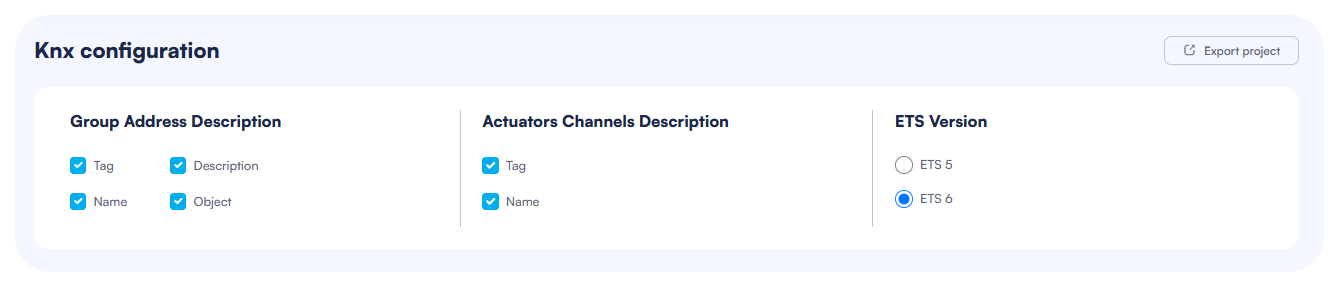
ETS Project Export
Export Settings
To export your ElauPro project to ETS:
- Navigate to the KNX section in the main menu
- Configure the export settings in the "Group Address Description" section:
- Check "Tag" to include device tags in group addresses
- Check "Description" to include descriptions
- Check "Name" to include device names
- Check "Object" to include object types
- Configure the "Actuators Channels Description" section:
- Check "Tag" to include tags in actuator channel descriptions
- Check "Name" to include names in actuator channel descriptions
- Select the ETS version you are using (ETS 5 or ETS 6)
- Click the "Export project" button in the top-right corner
The system will generate an ETS project file that you can download and import into your ETS software.
Importing Into ETS
Once you have exported your project from ElauPro, follow these steps to import it into ETS:
- Open your ETS software
- Select "Import" from the File menu
- Browse to the location of your exported file
- Follow the ETS import wizard instructions
- Open the master actuators “Parameters” tab once, all objects and links will then appear in the “Group Objects” tab.
After importing, you can add additional KNX devices to your project in ETS and configure them as needed.
NOTE: When importing a project in ETS 6, a warning “Import Conflict” saying that another project was found with the same identifier could occur. In that case, make sure to select “Import Copy”.
Group Address Import
Importing Addresses from ETS
ElauPro allows you to import group addresses from your ETS project, which is particularly useful when you have expanded your ETS project with additional devices or want to integrate devices not included in the original ElauPro configuration.
Exporting Group Addresses from ETS
Before importing into ElauPro, you need to export your group addresses from ETS in XML format:
- Open your project in ETS
- Go to "Group Addresses" view
- Right-click on the main group addresses folder
- Select "Export" from the context menu
- In the Export dialog:
- Choose "XML" as the file format
- Click "OK" to generate the XML file
This XML file contains all the group addresses and their properties from your ETS project and is ready to be imported into ElauPro.
Importing into ElauPro
To import group addresses:
- In the KNX section, locate the "Import Group Addresses" area
- Click the "Import Addresses" button
- Select your Group Addresses export file (.xml)
- ElauPro will process the file and extract all group addresses
- Review the imported addresses to ensure they are correct

Using Imported Addresses
After importing group addresses from ETS, you can use them within ElauPro:
- Widget Configuration: Link imported addresses to visualization widgets
- Create new manual widgets in the Visualization section
- Assign imported group addresses to widget objects
- Configure data types and visualization parameters
Imported addresses appear on the KNX section and in the visualization widgets edition, on the right side of the communication objects and can be filtered by name or address value using the search functionality.
Note: If no group addresses have been imported yet, the system will display "No group addresses have been imported yet" as shown in the screenshot.