
The Reports section in ElauPro provides comprehensive documentation of your project configuration that can be shared with clients, electricians, and other stakeholders. These reports serve as valuable reference materials during installation and maintenance phases of your KNX projects.
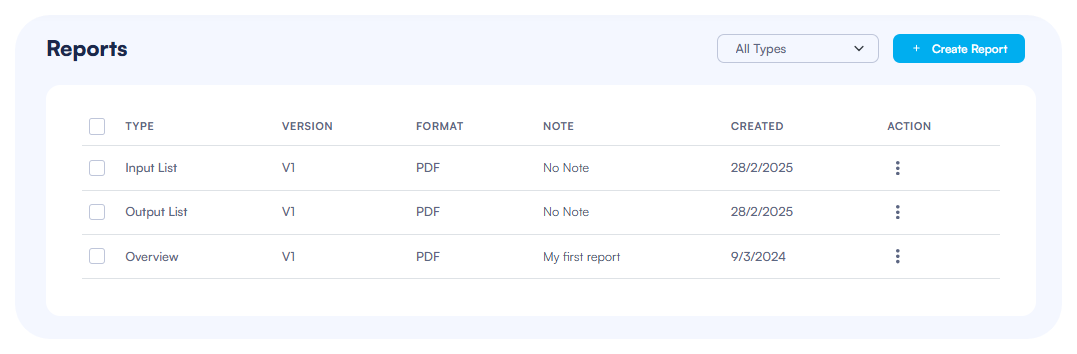
Available Reports
ElauPro offers three main types of reports that document different aspects of your project configuration:
Project Overview
The Project Overview report provides a complete summary of your project, including:
- Building structure with zones and rooms
- Device inventory organized by room and category
- Total count of devices by type
This report serves as an excellent project summary for client presentations and project handovers, giving a bird's-eye view of the entire installation.
Input Configuration
The Input Configuration report documents all input devices and their connections to outputs, including:
- List of all input devices (push buttons, sensors, etc.)
- Detailed mapping of which input controls which output
- Configuration of short and long press actions
- Input device locations by room
This report is particularly useful for customer approval during design to understand how the system will be configured and for project documentation, providing a simple way to check that push buttons control the correct devices.
Panel and Actuator Configuration
The Panel and Actuator Configuration report (Output List) details:
- All panels created in the project
- Master actuators and extensions in each panel
- Channel assignments for all devices
- Circuit names and numbering
- Device tags and identifiers
This technical documentation is essential for the installation phase, providing electricians with clear guidance on how to connect devices to the appropriate actuator channels.
Generating Reports
PDF Export
To generate a PDF report:
- Navigate to the Reports section in the left sidebar of ElauPro
- Click the "+ Create Report" button in the top-right corner
- In the dialog box that appears, select:
- Report Type (Overview, Input List, or Output List)
- Format (PDF is the default format)
- Optional: Add notes about the report for future reference
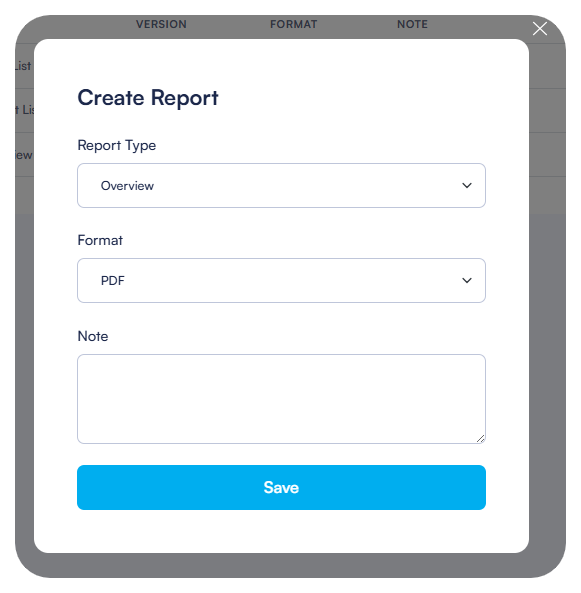
- Click "Save" to generate the report
- The new report appears in your reports list, showing:
- Type: The type of report
- Version: The version number (increments with each new generation)
- Format: The file format (PDF)
- Note: Any notes you've added
- Created: The date the report was generated
- Action: Options for managing the report
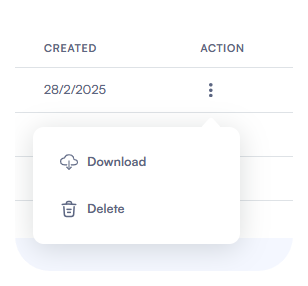
- To download a report, click the three dots in the Actions column and select "Download"
The generated PDF reports maintain the same styling and organization as seen in the ElauPro interface.
Tips for Effective Report Usage:
- Generate updated reports after significant project changes to ensure all stakeholders have the latest information
- Include reports in your project documentation package for clients
- Provide the Input and Output List reports to electricians before installation begins
- Use the Overview report for client presentations and approvals