
Alarm user and broadcasts
Create a user named “knx” on the alarm system. Set the same PIN in the ETS User code parameter. In the IP communication settings, enable UltraSync and Status Broadcast.
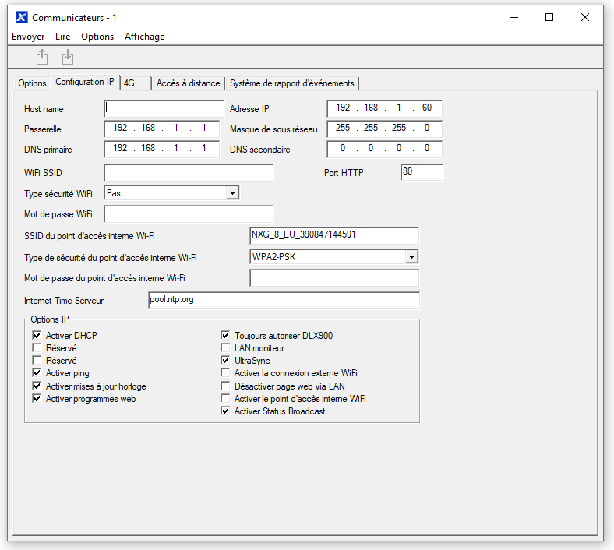
Gateway network settings
The factory gateway IP address is 192.168.1.51. Connect a laptop on a compatible network and open that address in a browser. Assign a suitable fixed IP address to the gateway. Set Device IP to the IP address of the alarm system.
NXG-7002 network arrangement
NXG-8 with NXG-7002 4G card
If your NXG-8 Control Panel is equipped with the NXG-7002 4G Card add-on, you must connect both LAN ports to ensure full functionality, as the UDP broadcasts required by the KNX Gateway only pass through the 4G card's dedicated ETH LAN port.
Recommended Setup for UDP Broadcasts:
The most straightforward and safest setup is to use a direct, isolated connection for the UDP broadcasts:
- Direct Connection for Gateway: Connect the ETH LAN port (on the 4G Card Add-on) directly to the KNX Gateway, or to a dedicated, isolated switch/VLAN. This port is what provides the UDP broadcasts when a 4G card is installed.
- Primary Network Connection: Connect the ETH WAN Port (on the Main Panel) to your main network switch. This is required for communication with external UltraSync servers.
Important DHCP Warning:
The ETH LAN port on the 4G Card add-on runs an internal interface that also acts as a DHCP server (typically issuing IPs in the 192.168.33.xx range). Connecting this port directly to your main network without isolation (VLAN or DHCP Guarding) will cause network disruption by handing out conflicting IP addresses to other devices. The recommended isolated setup above avoids this issue.