BACnet/IP integration
BACnet/IP (ASHRAE 135) is the protocol of commercial HVAC: air handling units, VAV boxes, chillers, heat-pump controllers, energy meters and building management systems. HyperVisu reads and writes the objects of BACnet devices — an analog input for a temperature, an analog value for a setpoint, a binary value for an enable, a multi-state value for a fan stage — over UDP on the local network. Values arrive by change-of-value (COV) subscription where the device supports it, and by polling everywhere else; the choice is made automatically per object.
What you need: the BACnet/IP service enabled (see “Services & Protocols”), the device's IP address (or the address of the BACnet router in front of it), its UDP port (standard 47808), optionally its device instance, and the objects you want (type and instance) — or let the discovery and the object picker find them.
Connections. BACnet/IP is multi-connection: one connection per BACnet device (see “Connections”). The server opens one UDP socket for all of them. Fields:
| Field | Description |
|---|---|
| Device address | IP address of the BACnet device, or of the router in front of it. |
| Port | The UDP port the device listens on (standard 47808). |
| Device instance | The BACnet device object instance (0–4194302). Leave empty to skip the check; set it and a device answering with another instance is reported as wrong. |
| COV subscription lifetime | How long a change-of-value subscription lasts before it is renewed. Leave empty for the service default (600 s). |
| Poll Interval (seconds) | How often points without a COV subscription are re-read (default 30 s). COV is the fast path, so a slow poll is normal here. |
Creating the connection. In Add connection, select the BACnet card and enter an Instance Name and the Device address; Port and Device instance are optional (an empty port means the standard 47808). The dialog has no network scan and does not create a connection without an address: if you do not know the address yet, enter a provisional one and correct it with the scan afterwards. Click Create connection; the new connection opens in its settings.
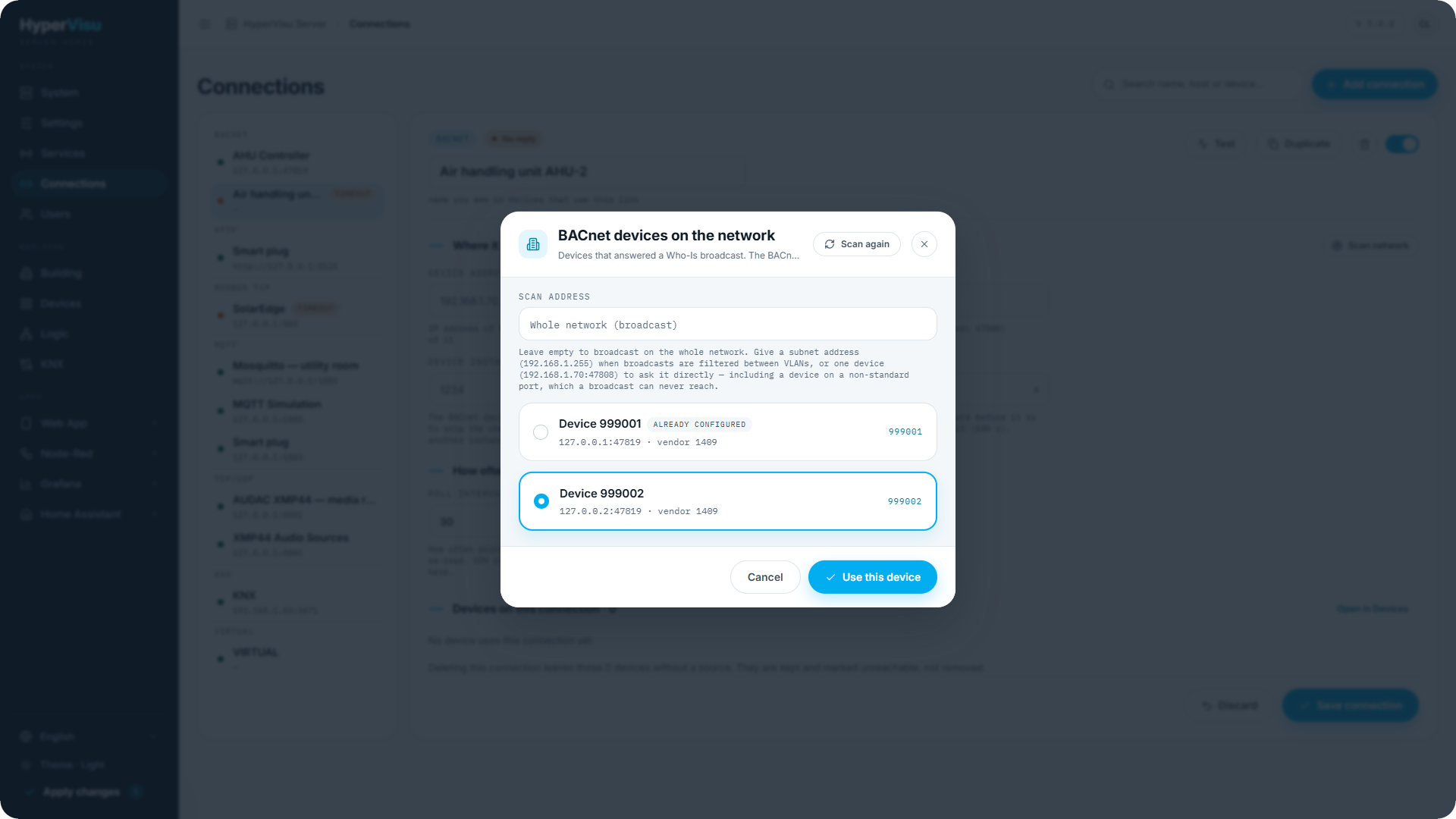
Scan network. The scan exists only on a saved connection. Beside Where it connects, click Scan network. The dialog BACnet devices on the network broadcasts a Who-Is and lists every device that answered — Device 192.168.1.255) when broadcasts are filtered between VLANs, or one device (192.168.1.70:47808) to ask it directly — the only way to reach a device on a non-standard port. Scan again repeats the scan; the last result is kept while the dialog is closed.
📘 Note: Already configured marks a device that a connection already points to, by address and port or by device instance. The connection you are editing counts, so your own controller can carry the mark.
Test sends a directed Who-Is to the device and checks the answer — including the device instance, when you set one. The result names the device instance that answered; when the wrong device answers, the test fails and names both instances. In the Add connection dialog, Test checks the values you typed. On a saved connection, it checks the saved values, not the fields you have not saved yet: click Save connection first, then Test.
Binding an object (see “Binding BACnet/IP” below). Per object you pick the Object type and the Instance number; the admin stores the address as <connection>:<type>:<instance>, e.g. 5:AV:12 (Analog Value 12 on connection 5). Object types:
| Type | BACnet object | Value | Notes |
|---|---|---|---|
AI / AO / AV | Analog input / output / value | Number | AO is commandable. |
BI / BO / BV | Binary input / output / value | 0/1 | BO is commandable. |
MSI / MSO / MSV | Multi-state input / output / value | Whole number, starting at 1 | MSO is commandable. |
The object's data type string carries the options the editor offers: [TYPE][:PROP=<id>][:PRIORITY=<1-16>][:COV=AUTO | Y | N][:SCALE=<f>][:OFFSET=<f>]:
| Field | Stored as | Meaning |
|---|---|---|
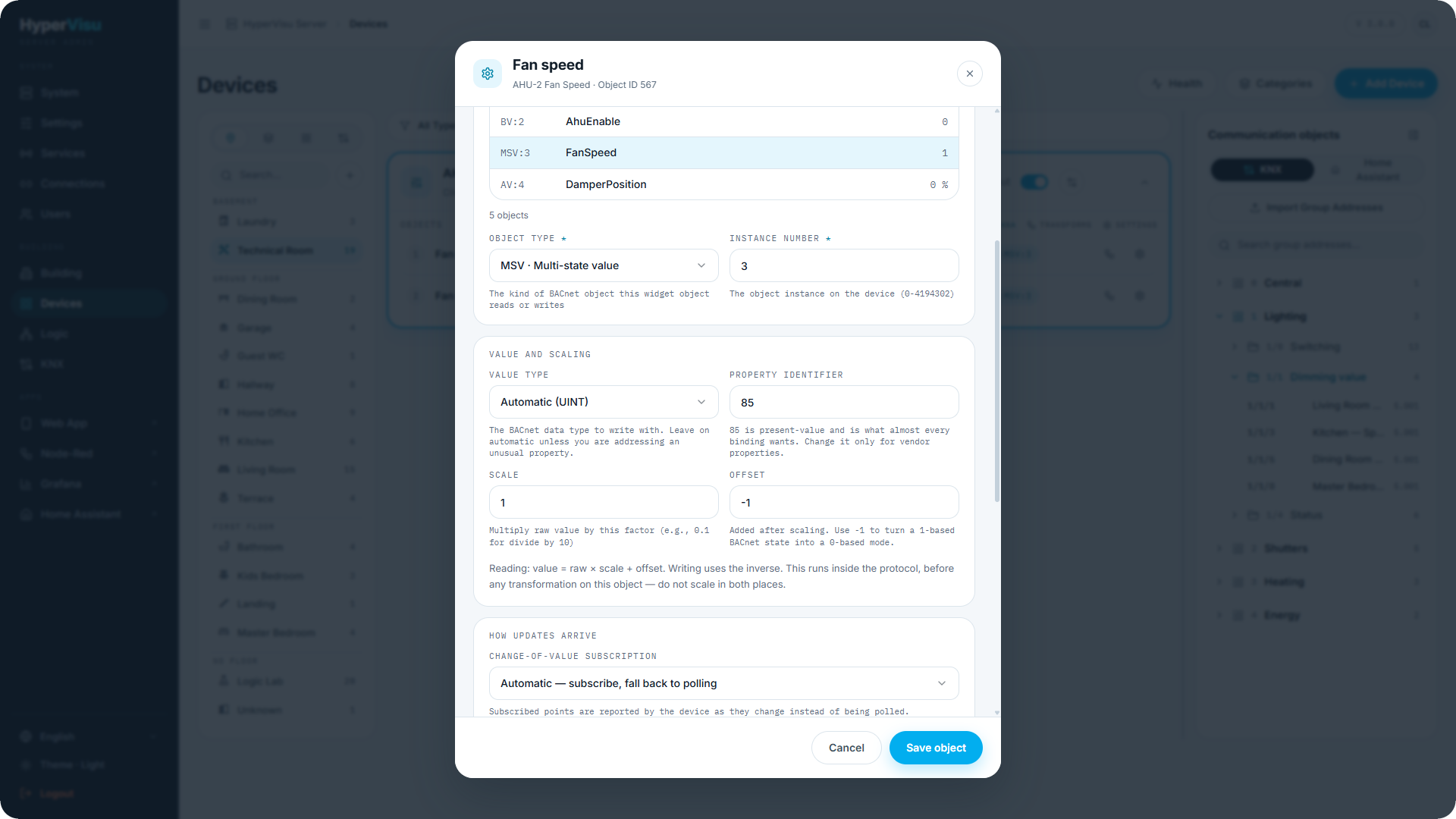
| Value type | REAL / BOOL / UINT / INT / ENUM | The BACnet data type used when writing. Leave on Automatic — it is inferred from the object type — unless you address an unusual property. |
| Property identifier | PROP= | 85 is present-value, which is what almost every binding wants. Change it only for vendor properties. |
| Scale / Offset | SCALE= / OFFSET= | Reading: value = raw × scale + offset; writing uses the inverse. This runs inside the protocol, before any transformation on the object (see “Value Transformations & Health”) — do not scale in both places. |
| Change-of-value subscription | COV= | Automatic — subscribe, fall back to polling (default). Required — warn if the device refuses. Never — always poll. A subscription reports property 85 (present-value) only; with any other property the point is polled. Shown under How updates arrive, on objects that read. |
| Write priority | PRIORITY= | BACnet command priority 1–16 for commandable objects. Leave empty to send none, which the device treats as 16. Shown under Commanding, on objects that write. |
📘 Note: BACnet multi-state values start at 1, HyperVisu modes at 0. Set the offset to
-1on a multi-state binding unless the device really is 0-based — the editor reminds you. The raw 1-based numbers are deliberately kept, so what you see matches what YABE or the building management system shows.
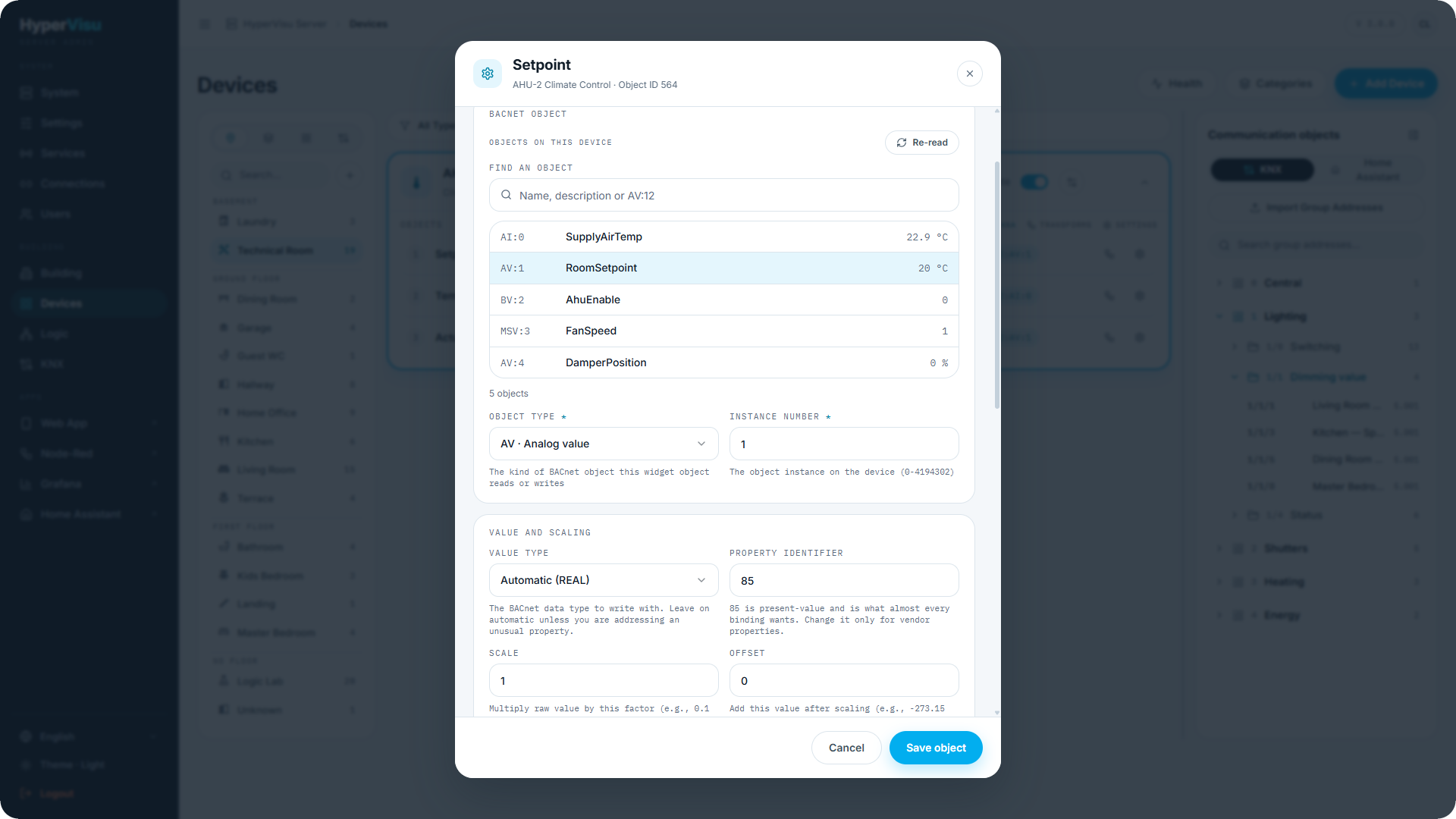
Object picker. With the connection running, the editor lists Objects on this device — the device's own object list with name, type and instance, present value and unit (e.g. AI:0 · SupplyAirTemp · 21.5 °C). Use Find an object to search by name, description or AV:12, click a row to fill type and instance (and Units, when the field is still empty and the controller reports a unit), Re-read to refresh. The object list is kept for one minute; Re-read forces a fresh read. Type and instance stay editable: when the list reads Object list unavailable, or the device refuses to enumerate itself, the point is still bindable by hand.
Behavior worth knowing
- COV first, poll as a safety net. Subscribed points are reported by the device as they change and leave the poll set; the subscription is renewed before it expires. A device that refuses the subscription is polled instead. A slow verification poll (every 10 poll intervals) still reads subscribed points, catching subscriptions silently dropped by a device reboot.
- Polling is batched (several properties per request) and falls back to one read per property on devices that cannot batch.
- Write feedback. After a write, a point without a live COV subscription shows the written value immediately rather than reverting until the next poll; with COV, the device's own notification confirms it.
- Status. UDP has no connection, so up means "answered recently" (within twice the poll interval, at least 90 s) and down means it did not; a device that stops answering is retried (every 30 s after five failed polls) and reports up again by itself.
- Priority arrays. A commandable object holds 16 priority slots. A building management system writing at a lower priority number masks HyperVisu, and the device appears to ignore the widget — the editor says so on commandable types; Write priority is the escape hatch.
Typical bindings: a switch on BV/BO; a dimmer or a shutter position on AV/AO (0–100); a climate device's temperature on AI (In), its setpoint on AV (In/Out) and its mode on MSV with offset -1; a meter on AI with the scale matching the device's unit; a fan stage on MSV/MSO with offset -1.
Worked example — an air handling unit controller
The controller is BACnet device 1234 at 192.168.1.70:47808 with supply air temperature AI:0, setpoint AV:1, enable BV:2 and fan speed MSV:3 (1–4).
- Enable BACnet/IP in Services (see “Services & Protocols”).
- Create a BACnet connection (see “Connections”): in Add connection, enter the Device address
192.168.1.70and click Create connection. On the saved connection, click Scan network, pick Device 1234 and click Use this device; leave the poll interval at30. Click Save connection, then Test: the result names device instance 1234. - In Devices, add an Analog input "AHU supply air" and select your BACnet connection under Protocol — in its value object pick
AI:0from the object picker. - Add an Analog output "AHU setpoint": object
AV:1, direction In/Out, value type Automatic. - Add a Switch "AHU enable": object
BV:2. - Add an Analog output device named "AHU-2 Fan Speed" for the fan stage: bind its value object to
MSV:3with offset-1(BACnet states 1–4 become 0–3). A multi-state object needs a numeric widget — the Ventilation widget drives its speeds through separate on/off objects, so it cannot take a multi-state value. - Click Save object on each object, then click Apply changes in the sidebar and confirm. The supply temperature arrives by COV as it changes; the others follow the poll or their own subscription.
Binding BACnet/IP
BACnet objects are configured in the object settings dialog (see “Object Settings, Logging & Notifications”). The cards are:
BACnet object
| Field | Description |
|---|---|
| Objects on this device | The device's own object list — AI:0 · name · present value unit — with Find an object (name, description or AV:12) and Re-read. Click a row to fill the two fields below. Shown when the connection is enabled and the BACnet/IP service runs; otherwise enter the type and instance by hand. |
| Object type | Analog input / output / value (AI/AO/AV), Binary input / output / value (BI/BO/BV), Multi-state input / output / value (MSI/MSO/MSV). |
| Instance number | The object instance on the device (0–4194302). The stored address is <connection>:<type>:<instance>, e.g. 5:AV:12. |
Value and scaling
| Field | Description |
|---|---|
| Value type | Automatic (inferred from the object type — REAL for analog, ENUM for binary, UINT for multi-state) or an explicit REAL / BOOL / UINT / INT / ENUM, used when writing. |
| Property identifier | 85 is present-value and is what almost every binding wants. Change it only for vendor properties. |
| Scale / Offset | value = raw × scale + offset on reading, the inverse on writing. Runs inside the protocol, before any transformation on this object (see “Value Transformations & Health”) — do not scale in both places. On a multi-state object the editor reminds you to set the offset to -1 (BACnet states start at 1, HyperVisu modes at 0). |
How updates arrive
| Field | Description |
|---|---|
| Change-of-value subscription | Automatic — subscribe, fall back to polling (default), Required — warn if the device refuses, or Never — always poll. Subscriptions report present-value only, so a binding on another property is polled. |
Commanding (commandable object types)
| Field | Description |
|---|---|
| Write priority | BACnet command priority 1–16. Leave empty to send none, which the device treats as 16. Another system writing at a lower priority number masks HyperVisu and the device appears to ignore the widget. |
The object types, the data type string and a worked example are in the BACnet/IP chapter above.