TCP/UDP integration
The TCP/UDP protocol is for devices that speak a simple command language straight over a network socket — no web API, no register model: professional audio players and matrices (AUDAC XMP44 and SourceCon modules), projectors (PJLink), displays and amplifiers behind RS-232-over-IP bridges, and custom microcontroller boards. You describe the command frames HyperVisu sends when a value changes, the patterns that extract values from the frames the device sends back, and optional query frames to poll. All the device-specific knowledge lives in the configuration, none in the server.
Each connection is one device, over TCP (one persistent connection, kept open and reconnected automatically) or UDP (datagrams). Over TCP, every object of the device shares that single socket — which is what devices that accept only one client (the XMP44 does) require.
What you need: the device's IP address and port, its command reference (frame syntax, delimiter, the commands and the feedback it sends), and whether it pushes state changes on its own or must be asked.
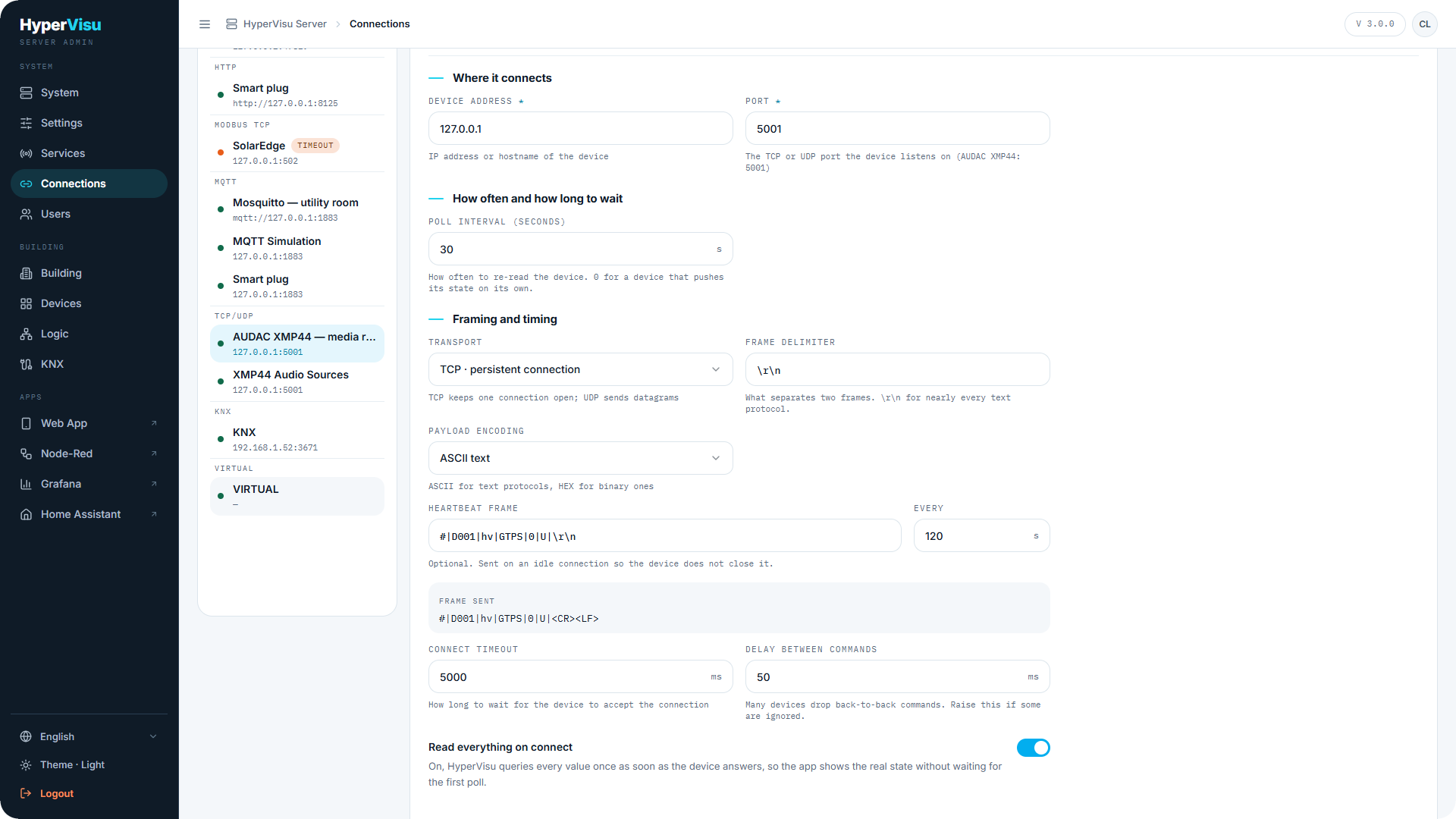
Connections. TCP/UDP is multi-connection: one connection per device (see “Connections”). Fields:
| Field | Description |
|---|---|
| Device address | IP address or hostname of the device. |
| Port | The TCP or UDP port the device listens on (AUDAC XMP44: 5001). |
| Poll Interval (seconds) | How often to re-read the device. 0 for a device that pushes its state on its own. |
| Transport | TCP · persistent connection or UDP · datagrams. |
| Frame delimiter | What separates two frames — \r\n for nearly every text protocol. |
| Payload encoding | ASCII text for text protocols, HEX bytes for binary ones. |
| Listen port | UDP only. For a device that pushes to a fixed port; leave empty and replies come back on the port the server sent from. |
| Heartbeat frame / Every | TCP only, optional. A frame sent on an idle connection so the device does not close it (at least every 5 s); the Frame sent preview shows it with control characters visible. |
| Connect timeout | How long to wait for the device to accept the connection (ms, default 5000). |
| Delay between commands | Many devices drop back-to-back commands; raise this if some are ignored (ms, default 50). |
| Read everything on connect | On: HyperVisu sends every query once as soon as the device answers, so the app shows the real state without waiting for the first poll. |
The Add connection dialog asks for the Instance Name, the Device address, the Port, the Poll Interval (seconds), the Transport and the Frame delimiter (defaults 30, TCP · persistent connection and \r\n). The other fields are under Framing and timing on the saved connection: select the new connection, set them and click Save connection.
Test in the Add connection dialog opens a socket to the address you typed. This proves the device is reachable, not that it understands your frames. On a saved connection, while the service already holds the device's single connection, Test reports the live state and the frames counted in and out instead of opening a second socket.
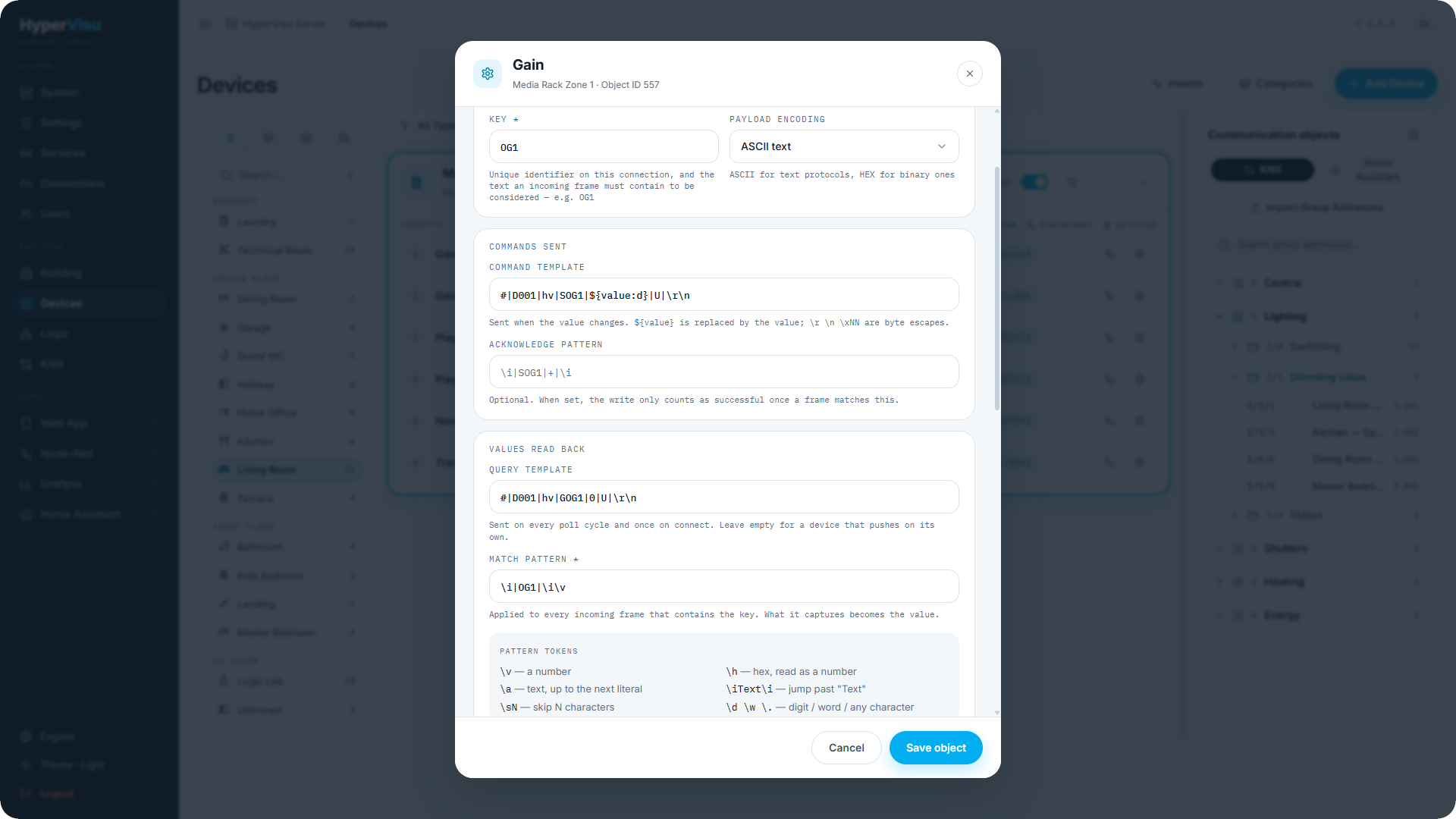
Binding an object (see “Binding TCP/UDP” below). Per object you give a Key — a short text that every reply carrying this value contains: only incoming frames that contain the key are tried against the object's match pattern (for AUDAC, the feedback command name: OG1, FREQ2). The comparison is case-sensitive, and a key cannot contain :. Two objects may share a key, for example a command object and its feedback object. The admin stores <connection>:<key>. The rest is the object's data type string, built from the editor's fields:
| Field | Stored as | Meaning |
|---|---|---|
| Payload encoding | ASCII / HEX | First token of the string. It does not change what is sent or how replies are read: the encoding that counts is the connection's, under Framing and timing. |
| Command template | SEND= | Sent when the value changes (Out and In/Out objects). ${value} is replaced by the value. |
| Different commands for ON and OFF → Command for ON / Command for OFF | SEND1= / SEND0= | For boolean objects whose device uses two separate commands (SPPLAY1 / SPSTOP1) rather than one with a 0/1 argument. Leave OFF empty for a button that only acts once. |
| Query template | POLL= | Sent on every poll cycle and once on connect (In and In/Out objects). Leave empty for a device that pushes on its own. |
| Match pattern | MATCH= | Applied to every incoming frame that contains the key; what it captures becomes the value. Without it an incoming object never receives a value. |
| Scale / Offset | SCALE= / OFFSET= | Reading: value = raw × scale + offset; writing uses the inverse. Numeric captures only. |
| Acknowledge pattern / Acknowledge timeout (ms) | ACK= / ACKTIMEOUT= | Optional. When set, the write counts as successful only once a frame matches the pattern within the timeout (default 2000 ms). |
Templates use ${value}, plus ${value:d} to round a scaled value to a whole number (a 0–100 % slider on a device that wants integer arguments), ${value:02d} for a whole number padded with zeros and ${value:1f} for a fixed number of decimals, and in HEX mode ${value:u8}, ${value:u16be}, ${value:u16le}, ${value:u32be}, ${value:u32le} for fixed-width bytes. \r, \n, \t and \xNN are byte escapes. In ASCII mode, a template that forgets the delimiter has it appended automatically.
Match patterns use these tokens; everything else is matched literally:
| Token | Captures / does |
|---|---|
\v | a number |
\h | hex, read as a number |
\a | text, up to the next literal in the pattern (for text objects) |
\iText\i | jump past "Text" |
\sN | skip N characters |
\d \w \. | a digit / a word / any character |
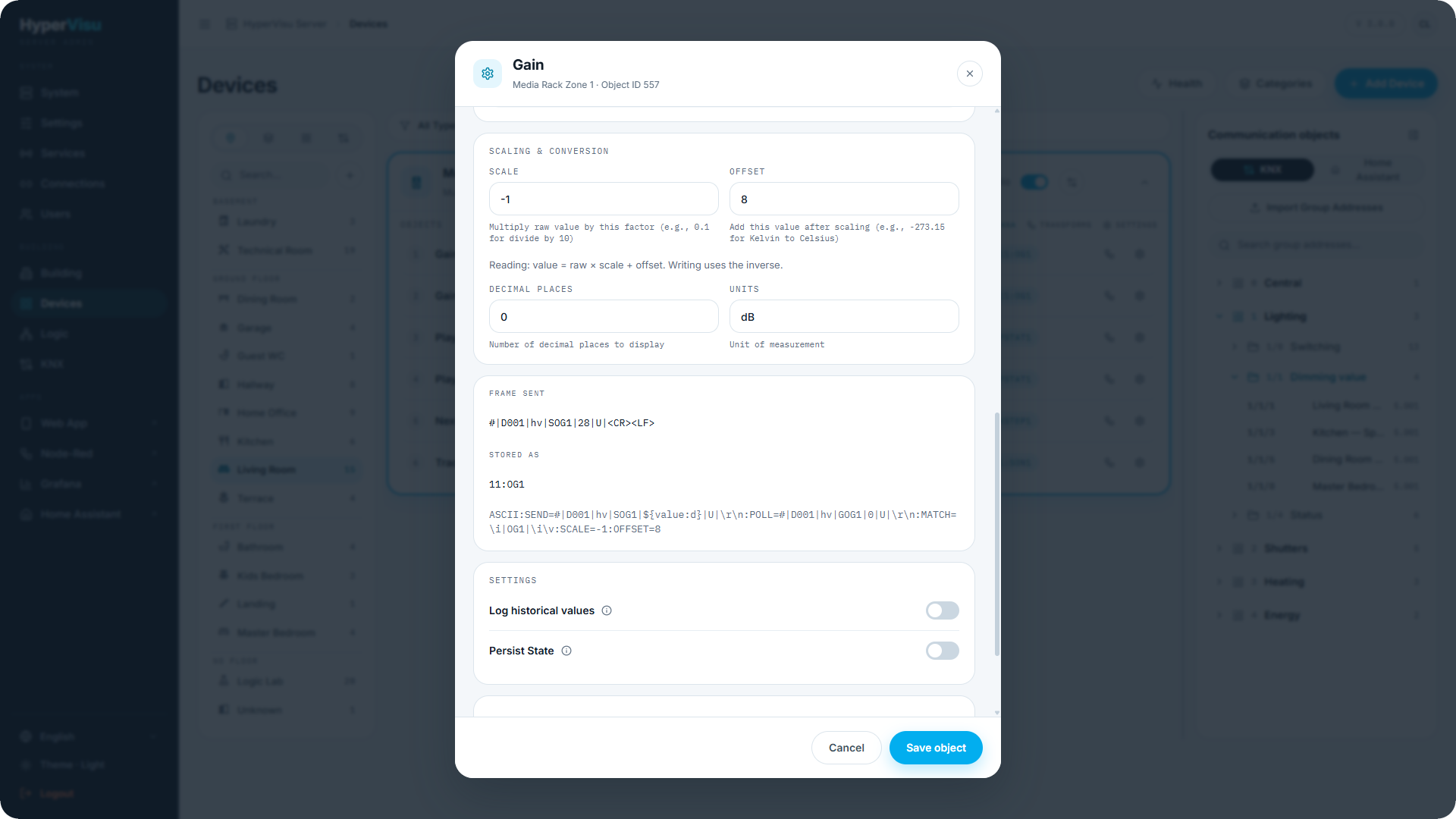
The editor shows Frame sent with control characters made visible (# | D001 | hv | SOG1 | 28 | U | <CR><LF>), and the stored string. Frame sent is a preview, not a log: every ${value…} is replaced by the sample value 28, without the value format or the scaling, and for an object with separate ON and OFF commands it shows only the ON command. It does not show the delimiter the server appends in ASCII mode. Verify a real command and reply against the device.
Behavior worth knowing
- Direction. In objects match (and poll, if they have a query); Out objects send; In/Out objects do both — the device's own echo is the confirmation, as with KNX status objects.
- One frame, many objects. Every incoming frame is tested against all incoming objects of the connection whose key it contains, so a single status frame can feed several objects. Identical query templates are sent once per poll cycle.
- TCP. The connection is reconnected with increasing delays after a failure; on reconnect the queries run again when Read everything on connect is on. Outgoing frames go through a queue spaced by Delay between commands.
- UDP. One datagram is one frame. Unsolicited pushes need the Listen port.
- Commands sent while the device is unreachable fail without blocking anything; the app shows the last known state.
Worked example — AUDAC XMP44 media player
The XMP44 listens on TCP 5001, accepts one client, and speaks frames # | D001 | <source> | <command> | <argument> | <checksum> | <CR><LF> — the literal U is accepted as checksum. Setting the output gain is SOG1 | <arg> with arg = 8 − dB; the device answers with an update frame … | OG1 | <arg> | …, which it also broadcasts when the gain changes at the front panel. Play and stop are two commands (SPPLAY1, SPSTOP1).
-
Create a TCP/UDP connection (see “Connections”): address
192.168.1.60, port5001, transport TCP, delimiter\r\n, poll interval30. Click Test, then Create connection. Select the new connection and, under Framing and timing, leave Read everything on connect on and set the heartbeat# | D001 | hv | GTPS | 0 | U | \r\nevery120s. Click Save connection. -
In Devices, add an Audio widget "XMP44 player" and select this connection under Protocol.
-
On the volume object (In/Out): key
OG1, command template# | D001 | hv | SOG1 | ${value:d} | U | \r\n, query template# | D001 | hv | GOG1 | 0 | U | \r\n, match pattern\i | OG1 | \i\v, scale-1, offset8— so −20 dB is sent as28and a received28reads as −20 dB. -
On the play object (Out, boolean): key
PLAY1, Different commands for ON and OFF: ON# | D001 | hv | SPPLAY1 | 0 | U | \r\n, OFF# | D001 | hv | SPSTOP1 | 0 | U | \r\n. -
On the track title object (In, text): key
SON1, query# | D001 | hv | GSON1 | 0 | U | \r\n, match\i | SON1 | \i\a |. -
Click Save object on each object, then click Apply changes in the sidebar and confirm. Moving the volume slider sends
SOG1, the device'sOG1echo confirms the new level, and a change at the device's front panel appears in the app.
💡 Tip: Keep the device's command reference open while binding — the key is the feedback name (
OG1), which on AUDAC differs from the command name (SOG1).
Binding TCP/UDP
TCP/UDP objects are configured in the object settings dialog (see “Object Settings, Logging & Notifications”). The cards are:
Frame addressing
| Field | Description |
|---|---|
| Key | A text that every reply carrying this object's value contains — e.g. OG1. Only incoming frames that contain the key are tried against the match pattern; the comparison is case-sensitive. No : allowed. The key does not have to be unique: two objects may share one, for example a command object and its feedback object. The stored address is <connection>:<key>. |
| Payload encoding | ASCII text for text protocols, HEX bytes for binary ones. |
Commands sent (outgoing objects)
| Field | Description |
|---|---|
| Command template | Sent when the value changes. ${value} is replaced by the value (${value:d} rounds it to a whole number); \r \n \xNN are byte escapes. |
| Different commands for ON and OFF | Boolean objects: reveals Command for ON and Command for OFF for devices that use two separate commands rather than one with a 0/1 argument. Leave OFF empty for a button that only acts once. |
| Acknowledge pattern / Acknowledge timeout (ms) | Optional. When set, the write only counts as successful once a frame matches this pattern within the timeout. |
Values read back (incoming objects)
| Field | Description |
|---|---|
| Query template | Sent on every poll cycle and once on connect. Leave empty for a device that pushes on its own. |
| Match pattern | Applied to every incoming frame that contains the key; what it captures becomes the value. Tokens: \v a number · \h hex, read as a number · \a text, up to the next literal · \iText\i jump past "Text" · \sN skip N characters · \d \w \. digit / word / any character. Without a match pattern the object never receives a value. |
| Scale / Offset | Reading: value = raw × scale + offset; writing uses the inverse. |
Below the cards, Frame sent shows the resolved outgoing frame for a sample value with control characters visible (… | 28 | U | <CR><LF>), and Stored as shows the data type string that will be saved. The pattern language, templates and an AUDAC worked example are in the TCP/UDP chapter above.